


November 2, 2026

Editorial Policy
All of our content is generated by subject matter experts with years of ad tech experience and structured by writers and educators for ease of use and digestibility. Learn more about our rigorous interview, content production and review process here.

Key Points
- Format choice is a user experience decision before it's a revenue decision: the question is when it's acceptable to interrupt the user, not which unit pays the most.
- Banners carry the deepest demand, which is why nearly every app starts there, even though the placement logic lives in your code and carries real implementation risk.
- Rewarded video is the most obtrusive format and also the most tolerated, because the user opts in and gets something concrete in return.
- Native ads trade implementation effort for UX fit, but they only pay off when there's enough demand behind them.
- More ad units does not equal more revenue: there's a point where additional inventory produces diminishing returns and starts dragging performance down.
Most format decisions get made backwards. A developer looks at a chart of average eCPMs, sees rewarded video at the top, and wires a rewarded unit into their app before asking whether their app has anything worth rewarding.

Then fill rate disappoints, users complain, and the format gets blamed.
In-app advertising uses four standard formats: banner, interstitial, rewarded video, and native, and they differ mainly in how much of the user's screen and attention they ask for. Each one sits at a different point on the spectrum between "present on screen" and "blocking the entire experience." The right answer depends on where your app has natural breakpoints, how engaged your users are, and how much demand exists for that unit type in the first place.
Here's what each format does in practice, what it costs you to implement, and where it fits.
The Four Formats at a Glance
Here's how the four formats compare on the dimensions that drive the decision: how much they interrupt, how hard they are to build, and what triggers them.
| Format | Interruption level | Trigger | Implementation effort | Typical sizes |
|---|---|---|---|---|
| Banner | Low: persistent, ignorable | None required, lives in the layout | Moderate: placement logic is on you | 320x50, 320x100, 300x250 (MREC) |
| Native | Low: blends with UI | None required, lives in the feed | Highest: custom templating per surface | Fluid, matches app UI |
| Interstitial | High: full screen | User action or transition | Low: call it and it runs | Full screen |
| Rewarded video | Highest: full screen, timed | User opt-in only | Low to moderate | Full screen |
One pattern stands out. The formats that are easiest to implement are the ones that interrupt the most. Full-screen units are a single call. Banners and native require you to decide where they live, when they load, and how they behave when the user navigates away. That's where things break.
Banner Ads: Still the Workhorse
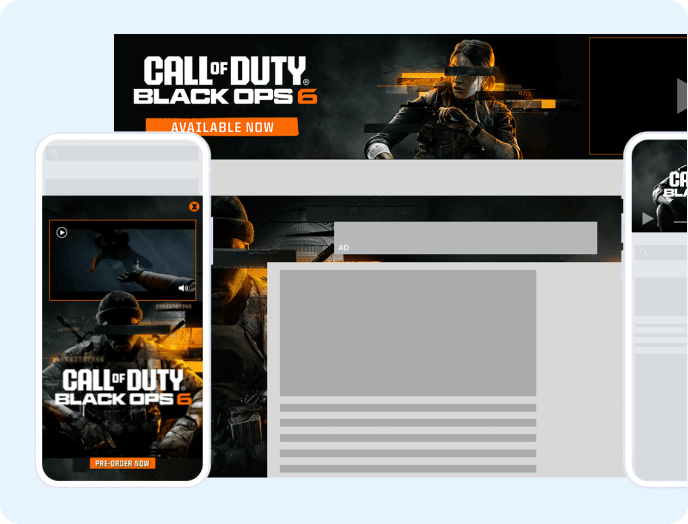
Banner ads are persistent, low-intrusion units that sit in a fixed part of the layout and don't require a user action to display. They've been declared dead roughly once a year for a decade. They're still the first unit most apps run, and for good reason.
They carry strong demand across geographies and app categories, they're less obtrusive than any full-screen format, and you can put them almost anywhere. A sticky banner anchored to the bottom of the screen. A banner slotted every eight items in a scroll view. A 300x250 MREC in a content break.
Region matters here. Banner performance in the US runs ahead of most other markets, which means a banner-led strategy delivers very different returns depending on where your users are.
Where Banners Go Wrong
Banners are the easiest format to implement badly, because the placement logic lives in your code rather than ours.
The most common failure pattern involves ads that are requested but never rendered. A developer hides a banner behind an animation, the animation logic breaks, and the app keeps requesting ads that no user ever sees.
The consequences compound:
- Render rate collapses: you're getting ads back from demand partners, but those ads aren't reaching a screen, so no impression is recorded and no revenue is earned.
- Fill rate degrades over time: demand partners notice they're sending ads into a void and reduce their participation accordingly.
- The symptom looks like a demand problem: revenue tanks, and the instinct is to blame the partner rather than audit the integration.
We've seen apps requesting 10 to 20 ads while only 10 to 20% of those ads reached a user. The cause was entirely technical, entirely on the app side, and entirely invisible from a developer's casual check that "ads are working."
Ownership is the other trap. Once you decide a banner lives on a specific screen, that screen owns the banner. Scenarios where a banner appears to persist across views but technically hides and re-shows require coordination between our SDK and your architecture, and that coordination is where mistakes happen.
Essential Background Reading:
- 6 Ways to Monetize Your App With Ads: A foundational look at the revenue models available to app developers before you get into format specifics.
- Unity Ads vs. AdMob: Which Mobile Ad Platform Is Right for You: A comparison of the two most common mediation platforms developers choose before implementing any format.
- AdMob Alternatives: App Monetization Solutions From DIY to Fully Managed: An overview of the options available depending on how much of the ad stack you want to manage yourself.
- AdMob Banner Ad Size Optimization: A closer look at banner sizing decisions that affect fill rate and viewability before you scale placements.
Interstitials: Full Screen at the Right Moment
Interstitial ads take over the entire screen at a transition point, typically with a close option available after a short delay. They sit between banners and rewarded video on the obtrusiveness scale.
The format needs a natural break. Moving between levels in a game. Completing a task flow. Returning from a background state. Fire an interstitial mid-scroll and you've turned an ad into an ambush.
Implementation is straightforward relative to banners. You call the unit, it does its thing, and you don't have to manage where it lives in your view hierarchy.
Pick Your Trigger Points Carefully
The decision is editorial rather than technical: where in your app does interrupting the user cost you the least? Getting this right is less about which moment you choose and more about building a consistent rule set so users aren't blindsided.
Good interstitial moments share a few characteristics:
- The user has completed something: level transitions, finished workflows, and post-submission states all carry built-in cognitive breaks.
- The user is already waiting: loading screens and transition states absorb an ad without adding perceived friction.
- Frequency is capped: an interstitial on every screen change trains users to close your app, not your ads.
Creative quality deserves attention here too. Interstitials that ship without a visible close button are a recurring problem across demand partners, and they do measurable damage to user sentiment. Category blocking and creative blocking aren't optional hygiene at scale.
Rewarded Video: The Most Intrusive Format Users Welcome
Rewarded video is a full-screen, opt-in format where a user chooses to watch a complete ad in exchange for an in-app reward. It's the most demanding format from a user's perspective: full screen, longer watch time, often with a countdown before the close button appears.
It also carries the clearest value exchange. The user opts in, watches, and receives something concrete: coins, a continue, an unlocked feature, a hint.
That exchange changes everything. Users who chose to watch an ad for a specific reward tolerate a level of interruption they'd never accept from an unsolicited full-screen unit.
The format thrives in gaming, where consumable economies create endless natural prompts. It works outside gaming anywhere your app has something a user wants but doesn't have: premium content, extra attempts, feature access.
Chess.com saw 4x higher CPMs with rewarded video compared to standard video units. That gap is why rewarded video dominates the conversation, and also why it gets forced into apps with nothing to reward.
If you can't name the reward in a single sentence, you don't have a rewarded video use case.
Related Content:
- Web Rewarded Video Ads: How the same value-exchange format performs on web, for publishers running both app and web properties.
- Prebid for Video Advertising: How header bidding infrastructure extends to video demand, complementing the format decisions covered here.
- The 7 Most Popular Ad Servers for Video Ads: A comparison of the ad server options that sit behind your rewarded and interstitial video implementations.
- 5 Video Advertising Techniques Publishers Should Be Using: Additional tactics for getting more value out of the video formats already covered in this guide.
Native Ads: UX Fit at the Cost of Effort
Native ads are rendered using your app's own components, typography, and spacing, so the unit takes on the visual language of the surface it appears on. For publishers who care deeply about user experience, that's the entire appeal. A native unit in a content feed reads as part of the feed rather than a rectangle dropped on top of it.
The tradeoff is work. You're building and maintaining the template, which means every surface variation is another implementation to get right and another place to introduce the same render-rate problems that plague banners.
What Makes Native Placements Perform
Native success comes down to the same two metrics that govern every other format, plus one that's specific to native. All three need to be in place before native earns its spot in your stack.
- Demand depth: native inventory draws from a narrower pool than standard banner sizes, and thin demand produces thin revenue regardless of how good your implementation is.
- Viewability: if the unit renders below the fold in a feed users rarely scroll, the technical integration doesn't matter.
- Visual honesty: matching your UI is the point, but the unit still needs clear ad labeling, or you're trading short-term blending for long-term trust.
Native is a format we support, and one we'd recommend to publishers where UX fidelity is the controlling priority. Start with banners and MRECs, prove the integration, then layer native in once the basics are stable.
Next Steps:
- Mobile App Ad Revenue Session Optimization Strategies for Maximum Monetization: A deeper dive into the session-level metrics that determine whether your format mix is actually working.
- How to Monetize With Ads Without Sacrificing User Experience: A practical framework for balancing ad load against retention, the exact tension this article raises.
- Prebid Wrapper Explained: How Publishers Simplify Header Bidding and Increase Revenue: An implementation guide for publishers ready to take more control over demand management.
- AI Ads: New Monetization Strategies for Publishers: A look at how AI-driven optimization is starting to change format and price-floor decisions.
Matching Format to App Type
Format strategy follows app structure. The useful question is where your app naturally pauses, how long sessions run, and what users want badly enough to trade attention for.
| App type | Primary formats | Why |
|---|---|---|
| Casual and mid-core games | Rewarded video, interstitial | Consumable economies and level breaks provide constant natural triggers |
| Content and feed apps | Banner, native | Continuous scroll with no clean interruption points |
| Utility and tools | Banner, interstitial | Short sessions, task completion creates a single clean break |
| Social and community | Banner, native, interstitial | Feed-heavy browsing with occasional navigation breakpoints |
None of these are prescriptions. They're starting points you should be testing against.
Knowing When You've Added Too Many
There's a point where adding more ad units makes sense, and a point past it where returns diminish and performance starts to suffer.
Finding that line requires watching more than revenue. Revenue moves on users, fill, and eCPM simultaneously, which makes it a lagging and noisy signal for format decisions.
The metrics that tell you more:
- ARPDAU (average revenue per daily active user): the north star for in-app monetization, because it normalizes revenue against the user base and exposes whether you're earning more per person or just burning through more inventory.
- Fill rate: the first place to look in any audit, because it tells you whether demand is connected and responding at all.
- Render rate: whether the ads you receive are reaching a screen, which is the gap where most app-side technical issues hide.
- App store sentiment: reviews and ratings after a format change are the closest thing you get to a direct user referendum on your ad load.
Nobody wants to see ads. You will annoy some percentage of users no matter what you do. The job is knowing how large that percentage is and how far you can push before it costs you more in retention than it earns in revenue.
App releases raise the stakes on all of this. A broken ad implementation on web is fixed in minutes. A broken implementation in a shipped app build requires a fix, an app store review, and a new release, which can take days. Test before you ship.
See It In Action:
- Video Ad Monetization for Health and Fitness Content Creators: How format strategy plays out for a vertical with highly engaged, session-heavy users.
- Entertainment Website Monetization Strategies Beyond Display Ads: A real-world look at layering video and high-impact formats on top of a display baseline.
- News Publisher Ad Revenue Monetization Strategy: When More Ads Won't Save You: A case against inventory inflation that mirrors the diminishing-returns problem covered in this guide.
Frequently Asked Questions
What is the difference between interstitial ads and rewarded video ads?
Interstitial ads are full-screen placements that appear automatically at a natural transition point, like a level change, and can usually be closed quickly. Rewarded video is also full screen, but the user opts in voluntarily and receives a specific in-app reward for watching the full ad, which makes it the more intrusive format that users tolerate anyway.
Do native in-app ads pay better than banner ads?
Native ads don't inherently pay better than banners. Native demand is thinner across the industry than standard banner demand, so native revenue depends heavily on whether enough advertisers are bidding on that specific inventory, not on the format itself.
Are banner ads still worth running in a mature app?
Yes. Banners carry strong, consistent demand, work across nearly every app category, and can be placed without disrupting the user experience, which is why they remain the standard starting format even for mature, high-revenue apps.
How do you decide between interstitial and rewarded video for a gaming app?
Use interstitials at transition points the user expects, like moving between levels, and use rewarded video where you can name a specific reward the user wants, like extra coins or a continue. If you can't articulate the reward in one sentence, the app doesn't have a rewarded video use case yet.
How many ads is too many before it hurts retention?
There's no universal threshold. The signal to watch is whether app store ratings and user sentiment shift after a format or frequency change, combined with whether ARPDAU is climbing or just the raw ad count. Diminishing returns show up as falling render rate and fill rate well before revenue reports make the problem obvious.
Where We Come In
Format strategy is the easy part to write about and the hard part to maintain. The ongoing work is demand management, SDK maintenance, consent handling, and catching the technical regressions that silently eat your render rate between releases.
Our in-app monetization stack handles that layer. We maintain the SDKs, manage app-ads.txt through dynamic hosting so you point a single URL at us and we keep the file current, run consent management through our own CMP, and monitor demand partner performance across the ecosystem so underperformance gets caught at the partner level rather than blamed on your integration.
We also do build reviews before you go live, because the difference between an integration that works and one that quietly loses 70% of its ad requests is usually one missed step.
Formats are a decision. Keeping them performing is an operation. Apply now and let's look at what your app should be running.
