
-1.png?width=800&height=157&name=1-playwire-logo-primary-2021%20(1)-1.png)


July 22, 2026

Editorial Policy
All of our content is generated by subject matter experts with years of ad tech experience and structured by writers and educators for ease of use and digestibility. Learn more about our rigorous interview, content production and review process here.

Key Points
- The URL Inspection tool in Google Search Console is the fastest way to request indexing for a specific page, but it works best as a complement to structural signals, not a substitute for them.
- Submitting your XML sitemap through GSC and keeping it current gives Google a persistent map of your content, reducing the time new URLs spend in the crawl queue.
- Internal linking from high-authority pages is one of the most underused crawl accelerators: Googlebot follows links, so putting a fresh URL in the path of a frequent crawl is faster than waiting for Google to discover it on its own.
- The 24-hour view in Search Console collapsed the feedback loop on indexing, letting you see whether a new page is gaining search traction within hours of publishing.
- Indexing speed is a revenue problem, not just an SEO problem: every hour a high-value page sits unindexed is an hour it can't earn pageviews, ad impressions, or revenue.
You published something. Maybe it's a trending topic with a 48-hour shelf life. Maybe it's a high-CPM content category you've been building toward for months. Either way, it's sitting in your CMS right now, and Google hasn't seen it yet.
That wait isn't random. It's the result of how Googlebot allocates crawl budget, how it discovers new URLs, and how many signals you've sent it pointing at your fresh content. Most publishers are sending fewer signals than they could be, which means there's real room to close the gap.
This is a mechanics guide. We'll cover the three main levers for faster indexing, explain why each one works, and give you a prioritization framework so you're not guessing which one to pull first.

Why Getting Google to Index Your Site Is a Revenue Problem
Publishers sometimes treat indexing as a technical SEO concern, something to hand off to the dev team and revisit quarterly. That framing is expensive.
Impressions in search results are the upstream signal for pageviews, and pageviews are the denominator under every revenue metric you track: pageview RPM, session RPS, ad impressions. A page that isn't indexed can't rank, can't attract clicks, and can't serve a single ad unit. For evergreen content, a two-day indexing lag is annoying. For trending content, it's the difference between catching the wave and writing about it after the fact.
GSC's 24-hour view, launched as part of a broader data-freshness initiative that cut average data delay by almost half, means you can now see whether a new page is gaining search traction within hours of publishing. That visibility is only useful if the page is indexed in the first place. For a full breakdown of how GSC connects to your revenue pipeline, our Google Search Console guide for publishers on traffic, indexing, and ad revenue covers the whole chain.
Essential Background Reading:
- What Is Google Search Console? A Guide for Web Publishers: The foundational overview of what GSC is, how it works, and why publishers need it in their stack.
- What Does Google Search Console Do? A Feature-by-Feature Breakdown: A detailed walkthrough of every major GSC feature, including the URL Inspection tool and Page Indexing report.
- How to Set Up Google Search Console: A Step-by-Step Guide for Publishers: Get GSC properly configured before you start using it as an indexing and revenue tool.
- The Ultimate SEO Best Practices Checklist: The broader SEO foundation that makes faster indexing actually translate into sustained rankings and traffic.

The Three Levers for Faster Indexing
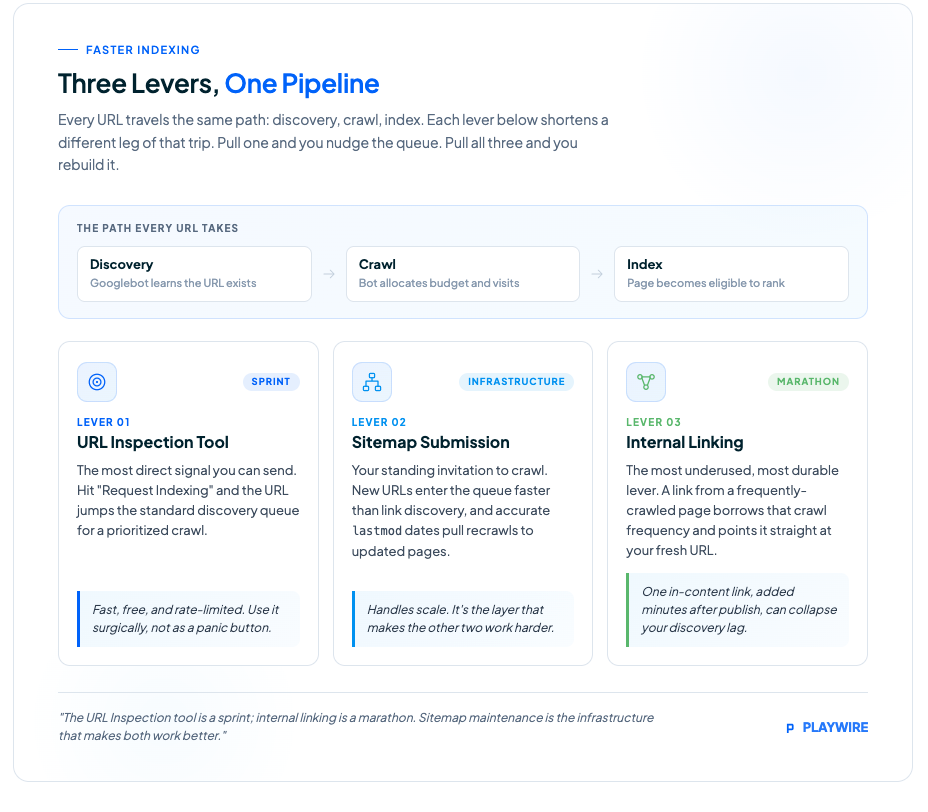
Getting Google to index your content faster comes down to two things: reducing the time Googlebot spends discovering your new URL, and reducing the time between discovery and the actual crawl. The three levers below each address a different part of that chain.
Lever 1: The URL Inspection Tool
The URL Inspection tool in Google Search Console is the most direct signal you can send. It allows you to check whether Google can access and index a specific page, and to request indexing after important changes. When you hit "Request Indexing" on a fresh URL, you're queuing that page for a prioritized crawl, moving it ahead of the standard discovery process.
This is the right first move for high-value individual pages: a major feature article, a new section hub, a page targeting a high-CPM keyword you've been waiting to launch. The tool gives you immediate feedback on whether Google can render the page, which surfaces problems early.
A few practical constraints worth knowing:
- Request limits apply: Google rate-limits indexing requests, so you can't fire this at every page you publish. Reserve it for content where indexing speed has a direct revenue impact.
- It's not instant: "Request Indexing" queues the page. Crawl timing still depends on Google's servers and your overall site crawl health.
- It doesn't override technical blockers: If your page has a
noindextag, a canonical pointing elsewhere, or a robots.txt disallow, the request won't overcome those. Fix the technical issue first.
The URL Inspection tool is fast and free. Use it surgically, not as a panic button.
Lever 2: Sitemap Submission and Maintenance
Your XML sitemap is Google's standing invitation to crawl your content. Google Search Console's Page Indexing report shows which pages Google has discovered, crawled, and indexed, and for most publishers, the pages that consistently fail to appear there are ones that weren't in the sitemap, were added late, or were buried under a sitemap that hadn't been verified in GSC.
The mechanics are simple but frequently neglected. Submitting your sitemap through GSC gives Google a structured list of your URLs along with metadata like last-modified dates. When that date changes, it signals that content has been updated and is worth recrawling. When a new URL appears in the sitemap, it enters the crawl queue faster than URLs Google has to find by following links.
Here's how to make your sitemap work harder:
| Sitemap Practice | What It Does | Revenue Impact |
|---|---|---|
| Dynamic sitemap generation | New URLs appear in the sitemap immediately after publish, not on the next manual export | Cuts discovery lag from hours to minutes |
lastmod tag accuracy | Accurate last-modified dates signal genuine content updates and attract recrawls | Keeps high-performing pages fresh in rankings |
| Sitemap verified in GSC | Google's crawlers know exactly where to find your sitemap and check it regularly | Reduces reliance on link discovery alone |
| Sitemap index for large sites | Splits a large URL inventory into manageable chunks, preventing parse errors | Ensures Google sees your full content library |
| Priority URLs near the top | Some crawlers process sitemaps sequentially, so high-value pages listed first may get crawled sooner | Marginally faster indexing for your top content |
For publishers running CMS platforms like WordPress, dynamic sitemap plugins handle most of this automatically. The key check is confirming the sitemap is submitted and verified in GSC, and that the lastmod values are actually updating when you publish.
Lever 3: Internal Linking from Crawled Pages
This is the lever most publishers underuse, and it's one of the most durable. Googlebot follows links. When you add an internal link to a new page from an existing page that Googlebot crawls frequently, you're putting your fresh URL in the path of a bot that's already visiting.
The logic: Googlebot allocates crawl budget based on a site's authority and historical crawl patterns. High-authority pages get crawled more frequently than new ones. A link from a frequently-crawled page to a new URL effectively borrows that crawl frequency and applies it to your fresh content.
Practical implications:
- Link from your homepage or section hubs first: These are typically your highest-crawl-frequency pages. A new article linked from your homepage gets discovered faster than one buried in a category archive.
- Use your "most recent" or "related posts" modules: If these modules are crawled regularly, they become an automatic discovery channel for every new URL you publish.
- Prioritize contextual links over sidebar links: Googlebot weights in-content links more heavily than navigational ones. A sentence-level link within a related article sends a stronger signal than a widget link.
- Don't wait for a site-wide update: You can add a single internal link to a new page within minutes of publishing. That one edit can collapse your discovery lag significantly.
Internal linking isn't a one-time task. Publishers who treat it as an ongoing editorial discipline, linking new content to old and old content to new, build a site architecture that Google crawls more efficiently over time. For a fuller treatment of how internal linking supports your overall search strategy, see our guide on how to use Google Search Console to improve SEO on your publishing site.
Related Content:
- How to Index My Site on Google: Diagnosing and Fixing Coverage Issues: Detailed diagnosis and fixes for every indexing status you'll encounter in the Page Indexing report.
- SEO for Publishers: How to Build a Search Strategy Around Your Content Model: How indexing speed fits into a broader content and search strategy built around your publishing model.
- Session-Based Ad Layout Strategy: Beyond the Pageview Mindset: Once you're indexed and traffic flows, this is how to think about monetizing those sessions more efficiently.
- The 8 Best SEO Tools: How GSC fits alongside third-party rank trackers and site audit tools in a complete publisher SEO stack.
- AI Search Is Eating Publisher Traffic: Here's What to Do: Context on why getting indexed and ranked matters even more as AI-generated answers reshape search results pages.
Essential Background Reading:
- What Is Google Search Console? A Guide for Web Publishers: The foundational overview of what GSC is, how it works, and why publishers need it in their stack.
- What Does Google Search Console Do? A Feature-by-Feature Breakdown: A detailed walkthrough of every major GSC feature, including the URL Inspection tool and Page Indexing report.
- How to Set Up Google Search Console: A Step-by-Step Guide for Publishers: Get GSC properly configured before you start using it as an indexing and revenue tool.
- The Ultimate SEO Best Practices Checklist: The broader SEO foundation that makes faster indexing actually translate into sustained rankings and traffic.
Understanding GSC Indexing Statuses
The Page Indexing report in GSC doesn't just tell you what's indexed. It tells you exactly where in Google's pipeline each URL is stuck, and the distinction matters because the fix is different for each status. Our dedicated guide on diagnosing and fixing Google coverage issues goes deeper on every status you'll encounter, but here are the two that matter most for publishers focused on revenue.
"Discovered, currently not indexed" means Google knows the URL exists but hasn't crawled it yet. The most common causes: the page was added to a sitemap or found via a link, but Googlebot hasn't allocated crawl budget to it yet. Fix this by improving crawl efficiency: internal links from high-authority pages, removing low-value URLs that waste crawl budget, and using the URL Inspection tool to request prioritized crawling.
"Crawled, currently not indexed" is the more consequential status. Google visited the page and decided not to index it. That's a content or quality signal, not a discovery problem. Common causes include thin or duplicate content, poor page experience signals, or a page that's technically accessible but doesn't offer enough distinct value to warrant inclusion in the index. These pages are worth a deliberate review, since they may rank with better optimization rather than being pages Google has affirmatively rejected.
The revenue implication is direct in both cases. A URL stuck at "Discovered" is costing you crawl budget without returning pageviews. A URL stuck at "Crawled. Currently not indexed" went through Google's full evaluation and didn't make the cut, which means the content itself needs attention before any technical fix will help.
Related Content:
- How to Index My Site on Google: Diagnosing and Fixing Coverage Issues: Detailed diagnosis and fixes for every indexing status you'll encounter in the Page Indexing report.
- SEO for Publishers: How to Build a Search Strategy Around Your Content Model: How indexing speed fits into a broader content and search strategy built around your publishing model.
- Session-Based Ad Layout Strategy: Beyond the Pageview Mindset: Once you're indexed and traffic flows, this is how to think about monetizing those sessions more efficiently.
- The 8 Best SEO Tools: How GSC fits alongside third-party rank trackers and site audit tools in a complete publisher SEO stack.
- AI Search Is Eating Publisher Traffic: Here's What to Do: Context on why getting indexed and ranked matters even more as AI-generated answers reshape search results pages.
How Long Does Indexing Take?
There's no single answer, and any source that gives you one is being optimistic on your behalf. Indexing timelines depend on your site's crawl authority, how Google discovered the URL, and how much competing content Google is processing at the same time.
In general terms: high-authority sites with clean technical setups and strong internal linking can see new pages indexed within hours of using the URL Inspection tool. Sites with thinner authority or crawl budget issues may wait days to weeks for new content to appear, even after sitemap submission.
The practical framework is to use all three levers together. URL Inspection handles urgency, sitemap submission handles scale, and internal linking handles ongoing crawl efficiency. Publishers who rely on only one are leaving indexing speed on the table.
One honest note: Google rate-limits individual indexing requests through the URL Inspection tool. If you're publishing dozens of URLs daily, you cannot request indexing on each one individually. That's where sitemap health and internal linking carry the weight.

How to Prioritize the Three Levers
Not every piece of content needs all three levers at maximum. Here's how to think about prioritization based on content type and revenue stakes.
| Content Type | Recommended Priority | Reasoning |
|---|---|---|
| High-value trending piece (24-48 hour relevance window) | URL Inspection first, then internal links | Speed matters most. Use the direct request and immediately add links from high-crawl-frequency pages. |
| New section hub or evergreen anchor page | Sitemap update + internal links from existing content | These need sustained crawl attention. Sitemap ensures Google knows they exist; links build authority over time. |
| Standard daily article | Internal linking from recent/related pages | Fits naturally into editorial workflow. Sitemap will pick it up; no need to burn URL Inspection quota. |
| Updated high-performing page | URL Inspection + accurate lastmod in sitemap | Signal both the update and request a fresh crawl. |
The URL Inspection tool is a sprint; internal linking is a marathon. Sitemap maintenance is the infrastructure that makes both work better. Publishers who treat all three as part of a regular workflow, rather than emergency measures, see consistently faster indexing across their content library. For news publishers specifically, where a story's traffic window can close in hours, the urgency calculus is even sharper. Our guide on using Google Search Console for timely news content covers that workflow in detail.
Next Steps:
- SEO Publishing Best Practices: What the Data in Google Search Console Is Telling You: How to read GSC data as a revenue signal, not just an SEO scorecard.
- How to Use Google Search Console: A Revenue-Focused Workflow for Ad-Supported Publishers: The operational workflow for publishers who want to turn GSC into a regular part of their revenue stack.
- GA4 Views: Understanding Page-Level Metrics in Google Analytics 4: How to connect GSC indexing data to on-site engagement metrics in GA4 for a complete view of the content-to-revenue chain.
- Beyond Google Ad Revenue: Sophisticated Strategies for Sophisticated Publishers: Once your search traffic is protected, here's how to diversify and amplify what it earns.
- Taking Control of Your News Site Ad Strategy: A Publisher's Technical Playbook: The technical ad ops complement to your GSC and indexing workflow, especially for time-sensitive content.
What to Watch in Search Console After You Publish
Publishing and signaling is only half the job. Confirming that indexing actually happened closes the loop. The 24-hour view in the Performance report now gives you hourly granularity on recent content performance, which changes how quickly you can catch and respond to indexing problems.
Run this sequence after publishing high-value content:
- Immediately after publish: Add the URL Inspection request in GSC (if the page warrants it) and add at least one internal link from a high-frequency page.
- Within 24 hours: Check the Page Indexing report to confirm the URL has moved from "Discovered, currently not indexed" or "Crawled. Currently not indexed" into confirmed indexed status.
- Within 48 hours: Check the Performance report using the 24-hour view to see whether the page is generating search impressions. Impressions before clicks is normal; zero impressions after 48 hours warrants investigation.
One timing caveat: GSC Performance report data typically runs a 2-3 day delay, and extended data-processing delays have occurred before, including a multi-day freeze after October 19, 2025 and a Page Indexing report that stopped updating for nearly 30 days starting in November 2025. If numbers look frozen, check whether Google has flagged a known reporting issue before assuming your site has a problem. Our broader piece on how to use Google Search Console to protect your ad revenue covers how to build that diagnostic discipline into your regular workflow.
See It In Action:
- Spelling Bee Solver: 90% Year-Over-Year Revenue Increase: How a utility publisher turned faster monetization and high-impact ad units into a dramatic revenue lift after switching partners.
- Google's AI Search Updates Give Publishers a Real Shot at More Clicks: How recent changes to Google's search experience create new traffic opportunities for publishers with well-indexed content.
- Google Search Console for Publishers: How to Use GSC to Protect Ad Revenue: The pillar guide tying GSC's full feature set back to publisher revenue protection and amplification.
Frequently Asked Questions
How long does it take Google to index a new website?
A new website with no prior crawl history, no inbound backlinks, and no sitemap submitted to Google Search Console can take anywhere from a few days to several weeks to get indexed. Accelerate the process by submitting a verified sitemap in GSC, requesting indexing via the URL Inspection tool for your most important pages, and getting at least a few external links pointing to your domain so Googlebot has a path to find you.
Why is Google not indexing my website?
The most common causes are technical blockers (a noindex tag, a robots.txt disallow, or a misconfigured canonical), content quality issues (thin, duplicate, or low-value pages that Google doesn't consider worth indexing), and crawl budget problems (large sites with many low-value URLs where Googlebot never gets around to the pages that matter). Check the Page Indexing report in GSC to identify which specific status applies to your unindexed pages, then address the root cause for that status.
How do I force Google to index my site immediately?
You can't force it, but you can request it. The URL Inspection tool in Google Search Console lets you submit individual URLs for prioritized crawling. This moves the page ahead in the queue but doesn't guarantee immediate indexing, and Google rate-limits how many requests you can submit per day. For bulk URLs, a verified and accurate XML sitemap is more effective than individual requests.
How do I check if my website is indexed by Google?
Open Google Search Console and check the Page Indexing report for a full view of your indexed and non-indexed URLs. For a quick check on a single page, use the URL Inspection tool and enter the page's URL directly. You can also search site:yourdomain.com in Google to see a rough count of indexed pages, though this method is less precise than GSC's first-party data.
What does "Discovered. Currently not indexed" mean in GSC?
It means Google knows your URL exists, through a sitemap or an internal link, but hasn't crawled it yet. The page is in the queue but hasn't been visited. The fix is improving crawl efficiency: add internal links from high-authority pages, remove low-value URLs that waste crawl budget, and use the URL Inspection tool to request a prioritized crawl for pages where indexing speed has a direct revenue impact.
What does "Crawled. Currently not indexed" mean in GSC?
It means Google visited the page and decided not to include it in the index. This is a content or quality signal, not a discovery problem. Common causes include thin content, duplicate content, or a page that doesn't offer enough distinct value relative to what already exists in Google's index. The fix requires improving the content itself: more depth, better differentiation, or stronger on-page signals. No technical trick will override Google's quality assessment.
What is crawl budget and how does it affect indexing?
Crawl budget is the number of pages Googlebot will crawl on your site within a given time period. Sites with large numbers of low-value URLs, parameter-based duplicates, or broken links waste crawl budget on pages that don't contribute to rankings, leaving high-value content waiting in the queue. For publishers with large content libraries, managing crawl budget means auditing for low-value URLs, consolidating or removing thin pages, and using internal linking to guide Googlebot toward content that actually earns pageviews and ad impressions.
Does getting backlinks help Google index my site faster?
Yes, for two reasons. First, Googlebot discovers new URLs by following links, so an inbound link from an already-crawled external site puts your URL directly in the bot's path. Second, backlinks from authoritative domains increase your site's overall crawl priority, which means Google allocates more crawl budget to your site over time. A single quality backlink can accelerate indexing on a new URL faster than waiting for sitemap discovery alone.
What is IndexNow and does it help with indexing?
IndexNow is an open protocol that lets publishers notify search engines directly when content is published or updated, without waiting for a crawler to rediscover the URL. It's supported by Bing, Yandex, and other search engines. Google has not publicly confirmed IndexNow support as a primary indexing signal, though the protocol is worth implementing as a supplemental signal alongside GSC sitemap submission and URL Inspection requests.
Does page speed affect how quickly Google indexes my pages?
Page speed affects crawl efficiency, not indexing eligibility directly. Pages with poor Core Web Vitals scores or slow server response times cost more crawl budget per visit, which means Google crawls fewer of your pages in a given period. Keeping your pages fast and your server response times low lets Googlebot visit more URLs per crawl session, which indirectly accelerates indexing across your content library.
Next Steps:
- SEO Publishing Best Practices: What the Data in Google Search Console Is Telling You: How to read GSC data as a revenue signal, not just an SEO scorecard.
- How to Use Google Search Console: A Revenue-Focused Workflow for Ad-Supported Publishers: The operational workflow for publishers who want to turn GSC into a regular part of their revenue stack.
- GA4 Views: Understanding Page-Level Metrics in Google Analytics 4: How to connect GSC indexing data to on-site engagement metrics in GA4 for a complete view of the content-to-revenue chain.
- Beyond Google Ad Revenue: Sophisticated Strategies for Sophisticated Publishers: Once your search traffic is protected, here's how to diversify and amplify what it earns.
- Taking Control of Your News Site Ad Strategy: A Publisher's Technical Playbook: The technical ad ops complement to your GSC and indexing workflow, especially for time-sensitive content.
Amplifying the Traffic That Indexing Unlocks
Getting indexed faster means your content earns pageviews sooner. What happens to those pageviews next is the other half of the equation.
Our RAMP platform is built around the idea that traffic should earn everything it can. When search discovery does its job and sessions start flowing in, our yield optimization layer, with over 30 SSP and DSP integrations, client- and server-side header bidding, and machine learning managing price floors across your inventory, makes sure every one of those pageviews is monetized at its ceiling, not its floor.
The gap between "traffic I'm driving" and "revenue that traffic generates" closes in ways that standard setups can't match. More demand sources competing on every impression, optimized in real time. Spelling Bee Solver saw a 90% year-over-year revenue increase after switching to Playwire, and a 20% uplift within the first two months alone.
If your content is getting indexed and your revenue still isn't moving the way it should, that's a monetization architecture problem, not an SEO problem. We're good at that one.
See It In Action:
- Spelling Bee Solver: 90% Year-Over-Year Revenue Increase: How a utility publisher turned faster monetization and high-impact ad units into a dramatic revenue lift after switching partners.
- Google's AI Search Updates Give Publishers a Real Shot at More Clicks: How recent changes to Google's search experience create new traffic opportunities for publishers with well-indexed content.
- Google Search Console for Publishers: How to Use GSC to Protect Ad Revenue: The pillar guide tying GSC's full feature set back to publisher revenue protection and amplification.
