
-1.png?width=800&height=157&name=1-playwire-logo-primary-2021%20(1)-1.png)


July 22, 2026

Editorial Policy
All of our content is generated by subject matter experts with years of ad tech experience and structured by writers and educators for ease of use and digestibility. Learn more about our rigorous interview, content production and review process here.
Key Points
- Google Search Console is a free, first-party tool from Google that shows you how Google crawls, indexes, and ranks your site, with no sampling, no estimates, and no third-party interpretation layer.
- The Performance report tracks clicks, impressions, CTR, and average position, and for ad-supported publishers, every metric in it is a leading indicator of pageview volume and ad revenue.
- The Coverage report tells you whether pages are indexed and eligible to earn traffic, making it a production-line quality check for publishers pushing out content regularly.
- Enhancements reports surface structured data errors that affect rich results, which influence click-through rates and the volume of sessions your ad stack gets to monetize.
- Security and Manual Actions are low-frequency but high-urgency: either one can collapse your organic traffic overnight if left unaddressed.
Google Search Console is a free service from Google that lets site owners monitor how their content appears in Google Search results, diagnose indexing problems, and track search performance data pulled directly from Google's own systems. For ad-supported publishers, those capabilities make it one of the most revenue-relevant tools in the stack, not because it touches your ad server, but because it governs the traffic that feeds it.
Publishers who open GSC for the first time often see a dashboard of unfamiliar report names and walk away more confused than when they started. That's a waste. GSC delivers first-party data directly from Google with no sampling, no estimates, and no third-party interpretation layer. If you want to understand what Google Search Console is and why publishers should care, start there, then come back here for the report-by-report breakdown of what each section actually does, what problem it solves, and what a publisher should do with the information.

What the Performance Report Measures
The Performance report is where most publishers spend the majority of their time in GSC, and for good reason. It answers the question every ad-supported business needs to answer constantly: is my content finding an audience in search?
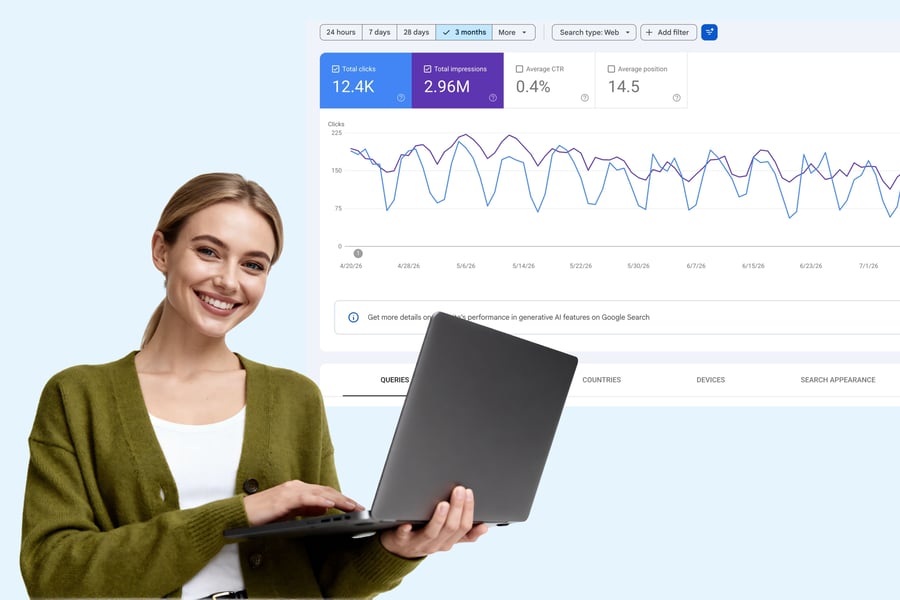
The report shows clicks, impressions, CTR, and average position, filterable by query, page, country, device, or date range for up to 16 months. Each metric maps to something concrete on the revenue side of your business.
| Metric | What It Measures | Revenue Connection |
|---|---|---|
| Impressions | How often your pages appeared in search results | Upstream signal for future pageview volume |
| Clicks | How often searchers visited your page | Closest GSC proxy for ad-eligible pageviews |
| CTR | Clicks divided by impressions | Shows whether you're converting visibility into sessions |
| Average Position | Where you typically rank for a query | Position drops are early warnings of traffic and RPS loss |
CTR deserves specific attention. A high impression count paired with a low CTR usually points to a mismatch between your title or meta description and what the searcher expects to find, and fixing that mismatch is often the fastest way to turn existing visibility into actual traffic. You already ranked. You're just not collecting the sessions you're eligible for.
The date-comparison feature is where the Performance report earns its keep as a diagnostic tool. You can use it to see seasonal trends or the impact of Google updates on your traffic. Compare week over week, month over month, and year over year, the same rhythm serious yield teams already apply to pageview RPM. The difference is that GSC shows you the problem one layer upstream, before it hits your ad server.
One operational note: GSC operates on a rolling 16-month data window. If you want a longer historical record for year-over-year revenue planning, export regularly. Data that ages out of that window is gone.

Finding Quick Traffic Wins in the Queries View
The Queries tab inside the Performance report is where publishers find pages that are close to breaking through but haven't yet. Cross-reference average position with CTR to find pages sitting at positions 5 to 15 with solid impression volume. A page at position 8 on a high-volume query is a single optimization pass away from page-one placement, and page-one positions drive substantially more clicks. More clicks means more sessions, more sessions means more ad impressions, and more ad impressions means more revenue.
This is a repeatable loop. If you want a structured approach to running this workflow consistently, our revenue-focused GSC workflow for ad-supported publishers covers the full cadence. GSC points at the exact URLs where a modest ranking improvement produces a direct, measurable impact on RPS.
The Branded vs. Non-Branded Filter
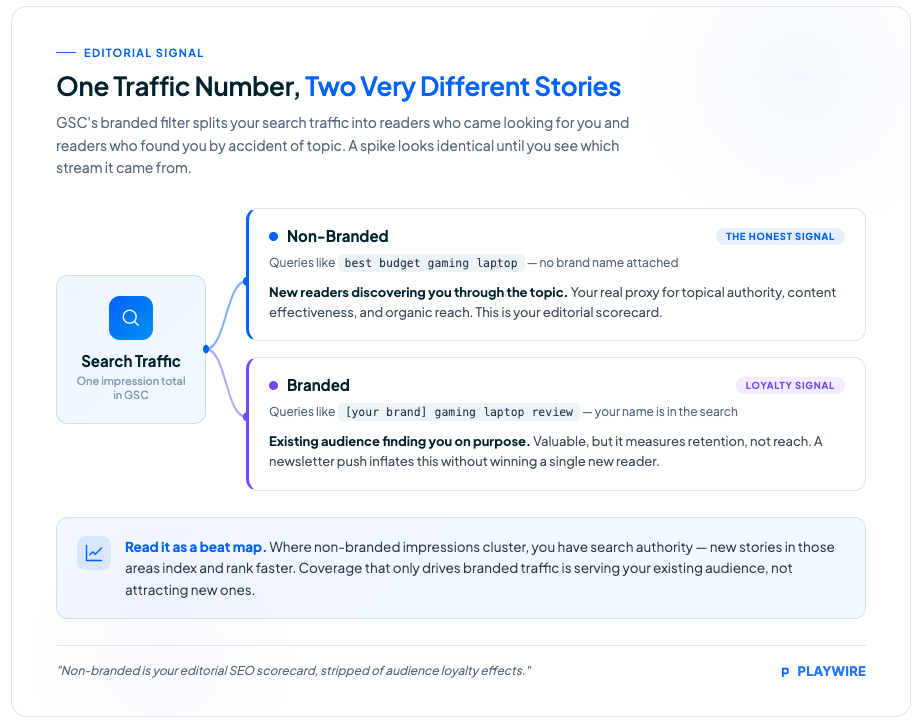
The branded queries filter automatically separates queries that include your brand name, variations, or misspellings from everything else, and applies across impressions, clicks, average position, and CTR. For ad-supported publishers, this distinction matters operationally.
Branded traffic tells you people already know your site exists. Non-branded traffic tells you whether new readers are discovering your content through search. Non-branded performance is the clearest proxy for topical authority, content effectiveness, and organic discovery. New readers are new pageviews and new ad impressions. If your non-branded impressions are flat or declining, your audience growth is stalling regardless of what your total impression numbers suggest.
A few constraints are worth knowing before you build reports around this filter. Google uses an internal AI-assisted system to classify queries, so some may be misclassified. The filter is also only available for top-level domain properties, not subdomain or path-level properties, and sites with low impression volume may not qualify. Check your property structure before depending on this segmentation for regular reporting.
How GSC Performance Data Connects to Ad Revenue
This is the connection most publishers miss, and it's the reason GSC belongs in your revenue stack alongside your ad server dashboards.
Your ad revenue is a function of pageviews. Your pageviews are a function of search rankings. GSC is the only tool that shows you the top of that chain using data straight from Google, not a third-party crawl estimate, not a sampled approximation. When GSC impressions rise on non-branded queries, new readers are discovering your content, and a wave of monetizable pageviews is typically on the way. When clicks drop, your pageview volume follows, and your total ad revenue feels it even if your RPM holds steady.
The practical implication: your yield reports tell you how well you monetized the traffic you got. GSC tells you whether that traffic was going to arrive at all. One is a rearview mirror. The other is a windshield.
Reading impressions as a demand signal is what separates publishers who react to revenue drops from publishers who anticipate them. A meaningful decline in impressions is your advance notice of a coming traffic dip, often visible in GSC days before it shows up in your ad server or your RPS reports. For a deeper look at how to use GSC to protect ad revenue specifically, that's where the revenue-protection playbook lives.
AI search is increasingly eating into publisher traffic in ways that GSC's Web search type is beginning to capture. AI Mode traffic now counts under that type, though you can't yet filter for it exclusively.

Google Search Console vs. Google Analytics
These two tools are frequently confused, and the distinction matters if you want to use either one properly.
Google Search Console covers everything that happens before a user clicks. It shows you how Google sees your site: whether pages are indexed, what queries your content ranks for, where you appear in search results, and how often searchers click through. The data comes from Google's search systems directly.
Google Analytics covers everything that happens after a user arrives. It tracks on-site behavior: sessions, bounce rate, time on page, conversion events, and the revenue-layer metrics your ad stack generates per visit.
| Dimension | Google Search Console | Google Analytics |
|---|---|---|
| Data source | Google's search index and crawl systems | Your site's tracking code |
| Focus | Pre-click: visibility, indexing, rankings | Post-click: on-site behavior and outcomes |
| Primary metrics | Impressions, clicks, CTR, average position | Sessions, pageviews, engagement, revenue |
| Ad revenue relevance | Upstream: predicts whether traffic will arrive | Downstream: measures how that traffic monetizes |
| Data delay | 2–3 days (shorter with 24-hour view) | Near real-time |
For an ad-supported publisher, neither tool is optional. GSC monitors the upstream pipeline. Analytics monitors the downstream yield. The two together close the loop from search impression to monetized session.
Integrating GSC with Google Analytics 4 offers a complete view of the user journey, from keyword impression to on-site behavior. That integration is worth doing early.
Essential Background Reading:
- What Is Google Search Console? A Guide for Web Publishers: The foundational explainer on what GSC is, why it exists, and why ad-supported publishers need it in their stack.
- How to Set Up Google Search Console: A Step-by-Step Guide for Publishers: If you haven't verified your property yet, start here before diving into the reports.
- Google Search Console Guide for Publishers: Traffic, Indexing, and Ad Revenue: The pillar reference covering how GSC connects to every layer of the publisher revenue pipeline.
- SEO for Publishers: How to Build a Search Strategy Around Your Content Model: Understanding GSC reports is more valuable when your content strategy is already built for search.
What the Coverage Report Measures
The Coverage report answers a more fundamental question than the Performance report: can Google even see your content?
The Page Indexing report shows which pages Google has discovered, crawled, and indexed. A page that isn't indexed cannot rank. It cannot earn a pageview. It cannot serve a single ad impression. For publishers pushing out content daily, this report functions as a production-line quality check.
The statuses you'll encounter break down like this:
- Indexed: the page is in Google's index and eligible to rank.
- Crawled, currently not indexed: Google found the page but chose not to index it. These pages may include content that could rank with better optimization, and they warrant a deliberate review rather than a shrug.
- Discovered, currently not indexed: Google knows the page exists but hasn't crawled it yet. Common on high-output sites where crawl budget is stretched.
- Excluded: a catch-all for pages intentionally or unintentionally kept out of the index, including pages blocked by robots.txt, canonical tags pointing elsewhere, or noindex directives.
The action for publishers is straightforward: any content you invested resources producing that sits in a non-indexed state is dead inventory. Prioritize reviewing "Crawled, currently not indexed" pages, because Google visited them and still passed. That's a signal worth investigating. For a systematic approach to diagnosing and fixing coverage issues, we've mapped out the full diagnostic path.
Using URL Inspection to Check Individual Pages
The URL Inspection tool is the Coverage report's companion for page-level diagnosis. It lets you see any page on your site exactly as Google sees it, check whether Google can access and index it, and request indexing after important changes.
The workflow for publishers is direct: after pushing a high-value article, paste the URL into the URL Inspection tool and request indexing. This nudges Google to crawl it faster than waiting for the next scheduled crawl. On a breaking news or trending topic story, the difference between crawled in two hours versus two days is real revenue. If you want the full breakdown of how to get Google to index your site faster, that covers every lever available. The 24-hour view in the Performance report, which shows data with only a few hours' delay, lets you confirm shortly after whether that content is starting to gain search traction.
Related Content:
- AI Search Is Eating Publisher Traffic: Here's What to Do: How the shift to AI-driven search is changing the traffic equation and what publishers can do about it.
- Google's AI Search Updates Give Publishers a Real Shot at More Clicks: The specific AI search changes that create click opportunities worth optimizing for in GSC.
- Google's AI Search Updates: What Publishers Actually Gain: A clear-eyed look at which AI search changes are real publisher wins versus noise.
- Beyond Zero-Click Search: How Publishers Can Reclaim Their Audience: Strategies for maintaining traffic and audience when search increasingly answers without a click.
- SEO Publishing Best Practices: What the Data in Google Search Console Is Telling You: How to read GSC signal patterns and translate them into content and optimization decisions.
What the Enhancements Reports Measure
Enhancements is a section most publishers check less often than they should. It surfaces structured data errors across your site, covering schema markup implementations like article structured data, FAQ schema, breadcrumbs, sitelinks searchbox, and others depending on your setup.
Structured data doesn't directly determine rankings. What it does is make your content eligible for rich results in Google Search: the visual treatments like expanded article features, FAQ dropdowns, and breadcrumb trails that appear beneath your title. Rich results increase CTR. Higher CTR converts search impressions into more clicks. More clicks become more pageviews and more sessions for your ad stack to monetize.
When the Enhancements section shows errors on a schema type you've implemented, those pages lose eligibility for those rich results. Find the affected URLs, identify the error in the schema markup, fix it, validate the fix using the URL Inspection tool, and request reindexing. It's maintenance work, but it directly protects the CTR performance of your organic content. Publishers running paywalled content should also review structured data guidelines for paywalled and gated content to make sure their schema isn't accidentally suppressing indexing eligibility.
What Security Issues and Manual Actions Measure
These two sections sit lower in the GSC navigation and see relatively low alert frequency, but when they fire, they require immediate attention. Both can collapse organic traffic quickly.
Security Issues flag when Google detects that your site has been compromised. Common triggers include hacked content, malware distribution, deceptive pages, or harmful downloads. Google may label your site with a warning in search results when a security issue is active, which depresses CTR severely even on pages that are ranking well.
Manual Actions are penalties applied by a human Google reviewer, not an algorithm. They're issued when a site violates Google's spam policies in ways that automated systems escalate to human review. Manual actions can result in specific pages or your entire site being demoted or removed from search results.
The table below covers the key differences between the two:
| Report | Triggered By | Traffic Impact | Response Path |
|---|---|---|---|
| Security Issues | Automated detection of site compromise | Immediate CTR suppression via user-facing warnings | Identify and remove the malicious content, then submit a review request |
| Manual Actions | Human Google reviewer finding policy violations | Demotion or removal from search results | Address the specific violation described, then submit a reconsideration request |
Neither of these is a "monitor weekly and optimize" report. They're alerts. Set up email notifications in GSC so you hear about these immediately rather than discovering them in your next revenue review.
Next Steps:
- How to Use Google Search Console: A Revenue-Focused Workflow for Ad-Supported Publishers: The step-by-step operating rhythm for using every GSC report covered here to protect and grow ad revenue.
- How to Use Google Search Console to Improve SEO on Your Publishing Site: Translating GSC data into concrete on-page and structural improvements that lift rankings.
- How to Get Google to Index Your Site Faster (And Why Every Hour Counts): Every lever available to speed up indexing after publishing, from URL Inspection to sitemap strategy.
- SEO for News Publishers: Using Google Search Console for Timely Content: The faster feedback loop GSC workflow that breaking news and trending content operations require.
- Google Paywalled Content Structured Data Guidelines: Implementation Guide: How to implement structured data correctly for paywalled content so the Enhancements report stays clean.
When GSC Data Goes Wrong: Known Reliability Issues
Any tool you build a revenue strategy on needs a reliability disclaimer. GSC earned one over the past year, and publishers who lean on this data need to know when the numbers are trustworthy and when they're temporarily broken.
GSC performance data runs on a 2–3 day delay by design. That's normal. What wasn't normal was a stretch of extended outages in 2025. Performance reports stopped updating after October 19, 2025, creating a multi-day data gap. Then, beginning around November 17–21, 2025, the Page Indexing report stopped updating and remained stuck for nearly 30 days. During both incidents, Google confirmed the issues were internal data-processing problems on their end, not problems with your website, and they did not affect your site's ranking, crawling, or indexing.
There's also a more recent issue worth flagging for anyone using GSC data in board decks or external reports. Google Search Console misreported impression data beginning May 13, 2025 due to a logging error, with corrections rolling out afterward.
The takeaway isn't to distrust GSC. Anchor your decisions to trends across multiple days, treat any single day's data as provisional, and keep a backup export process running. A Google-side hiccup should never leave you completely blind.
See It In Action:
- TheJeopardyFan.com: 2X RPMs After Switching from AdSense to Playwire: How a solo publisher with 1M+ monthly pageviews doubled RPMs and eliminated hours of manual ad ops work.
- Agency Revenue Drops Signal AI Search Traffic Shift for Publishers: Real-world data on how the AI search transition is showing up in publisher revenue figures.
- Google Search Console for Publishers: How to Use GSC to Protect Ad Revenue: The full revenue-protection playbook for publishers who want GSC working as an active part of their yield strategy.
Putting the Reports Together
Each GSC report answers a distinct question, and together they form a coherent picture of your search health.
The Performance report tells you whether your content is visible and converting that visibility into sessions. The Coverage report tells you whether your content is eligible to be visible at all. The Enhancements section tells you whether your structured data is protecting your CTR eligibility. Security and Manual Actions tell you whether something has gone wrong at a severity level that could undo all of the above.
For an ad-supported publisher, the chain runs like this: indexed pages rank, ranked pages earn impressions, impressions convert to clicks via CTR, clicks become pageviews, and pageviews become the sessions your monetization stack fills with ads. GSC monitors the entire upstream end of that chain. Your ad server handles the downstream end. Both ends need attention. If you want to go deeper on how to use GSC to improve SEO on your publishing site, that's where the optimization layer lives on top of this foundation.
For news publishers, using GSC for timely content requires a faster feedback loop than evergreen content operations. The 24-hour view and URL Inspection workflow become essential rather than optional.
Frequently Asked Questions
Is Google Search Console free?
Yes. Google Search Console is completely free. There is no paid tier, no usage limit based on traffic volume, and no premium version. Any site owner can verify their property and access the full feature set at no cost.
How often should I check Google Search Console?
Check the Performance report weekly to catch visibility drops before they compound into revenue loss. Review the Coverage report after every significant content publish to confirm new pages are indexed. Check Security Issues and Manual Actions immediately if you receive an email alert. Those cannot wait for a scheduled review.
What is average position in Google Search Console?
Average position is the mean ranking your pages held across all the search queries that triggered an impression during the selected date range. A page with an average position of 4.2 ranked somewhere around position 4 on average across those queries. Lower numbers are better. Position drops are early warnings of traffic loss, which translates directly to fewer sessions for your ad stack to monetize.
Does Google Search Console show keyword rankings?
Yes, in the Performance report's Queries view. You can see which search queries triggered impressions for your pages, how often you appeared, how often searchers clicked, and your average position for each query. The data covers a rolling 16-month window and includes far more long-tail queries than any third-party rank tracker typically captures.
What is the difference between Google Search Console and Google Analytics?
GSC shows what happens before a user clicks: search visibility, indexing status, rankings, and impressions. Google Analytics shows what happens after they arrive, covering sessions, on-site behavior, and revenue metrics. For ad-supported publishers, GSC is the upstream signal and Analytics is the downstream measurement. You need both.
Amplify What GSC Sends You
GSC hands you a better-trafficked site. Getting the most revenue out of every session that arrives is where our RAMP platform takes over. Our algorithms manage over 1.2 million price floor rules per website and optimize every impression automatically. Our yield team watches the downstream metrics, RPS, CPMs, fill rates, so that the sessions GSC helped you earn don't leave money on the table.
Publishers like TheJeopardyFan.com doubled their RPMs after switching their monetization from AdSense to RAMP, with the site's average RPMs in Q1 2025 matching or exceeding the best days under the previous setup. Traffic protected upstream through consistent GSC monitoring, monetization optimized downstream through a full-stack partner. That's the full pipeline.
Ready to see what your existing search traffic is actually worth? Apply to work with us and we'll show you the gap between what you're earning and what you should be.
