
-1.png?width=800&height=157&name=1-playwire-logo-primary-2021%20(1)-1.png)


July 22, 2026

Editorial Policy
All of our content is generated by subject matter experts with years of ad tech experience and structured by writers and educators for ease of use and digestibility. Learn more about our rigorous interview, content production and review process here.
Key Points
- GSC is most valuable as a recurring operational habit, not a panic-check when revenue drops.
- The Performance report's impressions and clicks are leading indicators of the pageview volume that feeds your ad revenue, so watching them weekly gives you advance warning before yield metrics feel the pain.
- CTR gaps, high impressions, low clicks. Represent inventory you're already eligible for but not collecting. They're the fastest wins in the tool.
- The branded vs. non-branded filter separates audience growth from brand loyalty, giving you an honest read on whether your content strategy is actually expanding your reach.
- A post-publish indexing check is non-negotiable. Every article stuck in "Crawled - currently not indexed" is content that cost you to produce and is earning nothing.
Most publishers who use Google Search Console use it wrong. They log in after a bad revenue week, stare at a traffic cliff, and try to reverse-engineer what happened. That's not a workflow. That's a post-mortem.
The publishers who get real value from GSC have a different relationship with it. They check it on a schedule, know exactly which numbers to look at, and take specific actions based on what they find. The tool rewards consistency over intensity.
This is the workflow: not a feature tour, not a setup guide, but the repeatable process for extracting revenue-relevant signal from GSC on a regular cadence.

What Google Search Console Is and Why It Belongs in Your Revenue Stack
Google Search Console is a free platform from Google that lets site owners monitor how their content appears in Google Search results. It shows you which pages are indexed, how they rank, how often they appear, and whether Google can crawl them at all.
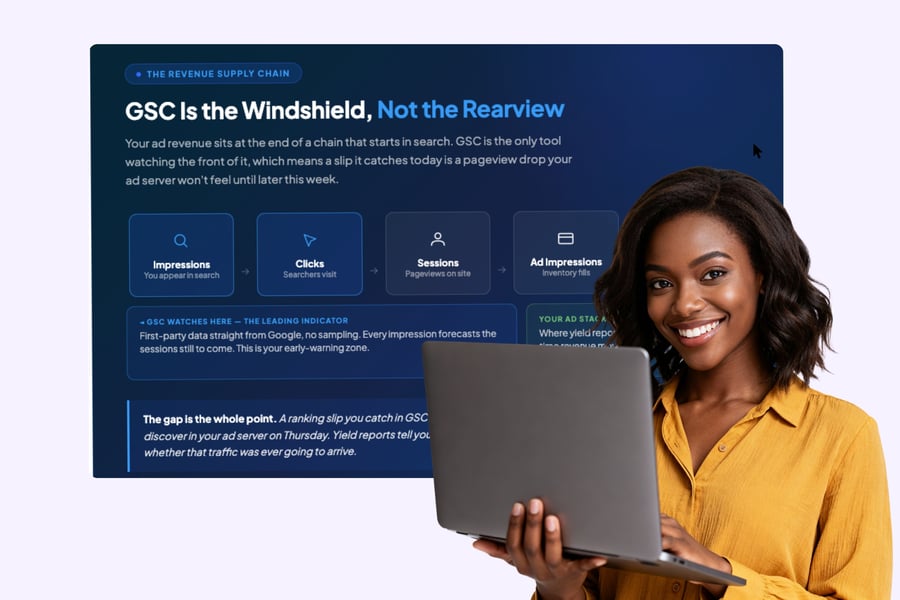
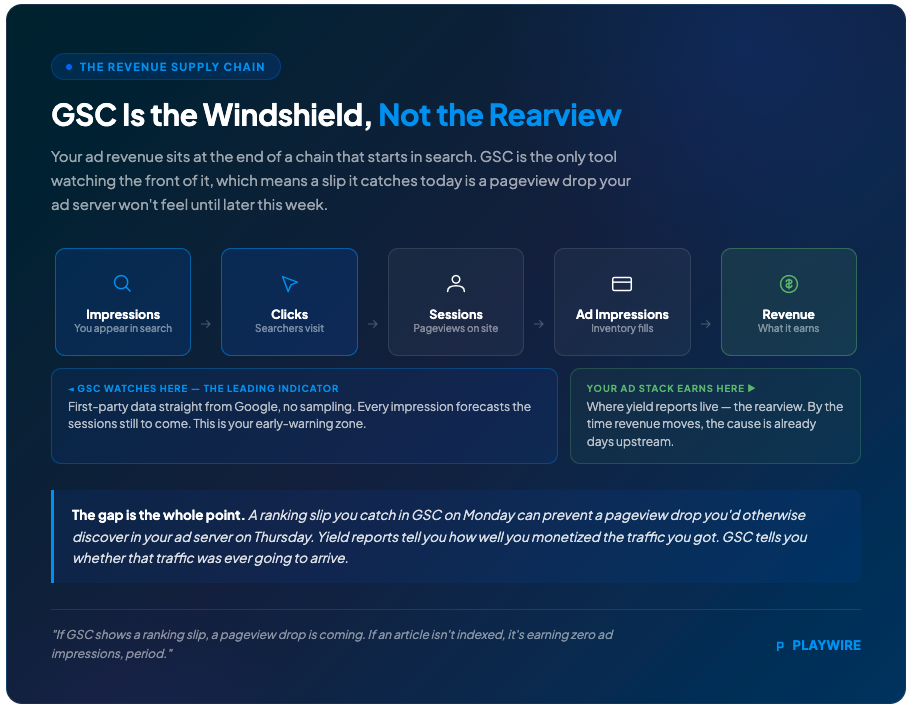
That's the standard definition. Here's the one that actually matters for ad-supported publishers: GSC is the only tool that shows you the upstream supply chain for your pageviews using first-party data directly from Google, with no estimates and no sampling. Every impression it reports is a leading indicator of the sessions that feed your ad stack. If GSC shows a ranking slip, a pageview drop is coming. If an article isn't indexed, it's earning zero ad impressions, period.
Third-party rank trackers like Ahrefs and SEMrush estimate keyword data based on their own crawls, while GSC pulls directly from Google. Studies have found that GSC typically records far more keywords than any single third-party tool, because those tools miss the long-tail queries that often make up a large share of real organic traffic. For an ad publisher, that long tail isn't a rounding error. It's a meaningful slice of the sessions generating your impressions.
Your yield reports tell you how well you monetized the traffic you got. GSC tells you whether that traffic was ever going to arrive. One is a rearview mirror; the other is a windshield. For a deeper look at what Google Search Console does across all its features, the feature-by-feature breakdown is worth having open alongside this workflow.
How to Set Up Google Search Console
Setup takes under ten minutes. Go to Google Search Console and sign in with a Google account that has access to your site. You'll be prompted to add a property. If you need a full walkthrough, our step-by-step setup guide for publishers covers every verification method in detail.
Choose between two property types:
| Property Type | What It Covers | Best For |
|---|---|---|
| Domain property | All subdomains and protocols (http, https, www, non-www) | Most publishers. Gives the fullest picture |
| URL prefix property | Only the exact URL prefix you enter | Specific subdomains or sections you want to track separately |
Domain properties require DNS verification. URL prefix properties offer several verification methods including an HTML tag, Google Analytics, or uploading an HTML file to your server. Most publishers should default to the domain property: it captures everything under your root domain and eliminates gaps in the data.
Once verified, GSC begins collecting data. It won't backfill historical data, so add your property as early as possible. Submit your XML sitemap from the Sitemaps section of the left-hand navigation so Google has a complete map of your content.
One setup note before you build reporting workflows around the branded vs. non-branded filter: the filter is only available for top-level domain properties, not subdomain or path-level properties, and sites with low impression volume may not qualify. Set up your property accordingly.

Understand What You're Monitoring
Before you build the habit, you need to know what you're watching for and why it matters to an ad-supported business.
Your ad revenue sits downstream of your traffic. Pageviews feed impressions, impressions feed your ad stack, and your ad stack generates revenue. GSC sits one layer upstream of all of it, monitoring whether Google can find, index, and surface your content in the first place. As Google's own documentation frames it, GSC tells you whether the traffic that monetizes will even show up before your yield reports ever see it.
The practical consequence: a ranking slip you catch in GSC on Monday can prevent a pageview drop you'd otherwise notice in your ad server on Thursday. That gap, between cause and revenue effect, is exactly where this workflow lives.
Three reports do almost all the work:
- Performance report: Clicks, impressions, CTR, and average position. Your traffic forecast and your quick-win finder.
- Page Indexing report: Which pages Google has indexed and which it hasn't. Your production-line quality check.
- URL Inspection tool: Page-level crawl and index status on demand. Your publish-day verification step.
Everything else in GSC is situational. These three are the core of the weekly and monthly rhythm.
How GSC Metrics Map to Ad Revenue
The Performance report sits at the center of any revenue-focused GSC workflow. Here's how each metric connects to your bottom line.
| GSC Metric | What It Measures | Why It Matters to Ad Revenue |
|---|---|---|
| Impressions | How often your pages appeared in search results | The upstream signal for future pageview volume. Rising impressions forecast more sessions to monetize. |
| Clicks | How often searchers actually visited | The closest GSC proxy for the pageviews your ad stack will fill. |
| CTR | Clicks divided by impressions | Reveals whether you're capturing the traffic you're eligible for. High impressions with low CTR means visibility you aren't converting into revenue-generating sessions. |
| Average Position | Where you typically rank for a query | Higher positions drive higher CTR and more pageviews. Position drops are early warnings of traffic loss. |
Essential Background Reading:
- What Is Google Search Console? A Guide for Web Publishers: The foundational overview of GSC. What it is, why publishers need it, and how it fits into your broader revenue stack.
- What Does Google Search Console Do? A Feature-by-Feature Breakdown: A complete walkthrough of every GSC feature and report, so you know exactly what each one measures before you build your workflow around it.
- How to Set Up Google Search Console: A Step-by-Step Guide for Publishers: Full verification walkthrough, property type selection, and sitemap submission. Everything you need before the workflow in this article makes sense.
- Google Search Console Guide for Publishers: Traffic, Indexing, and Ad Revenue: The publisher-specific reference guide connecting GSC data to traffic, indexing health, and downstream ad revenue metrics.
The Weekly Check: Protect Your Traffic Before It Hits Revenue
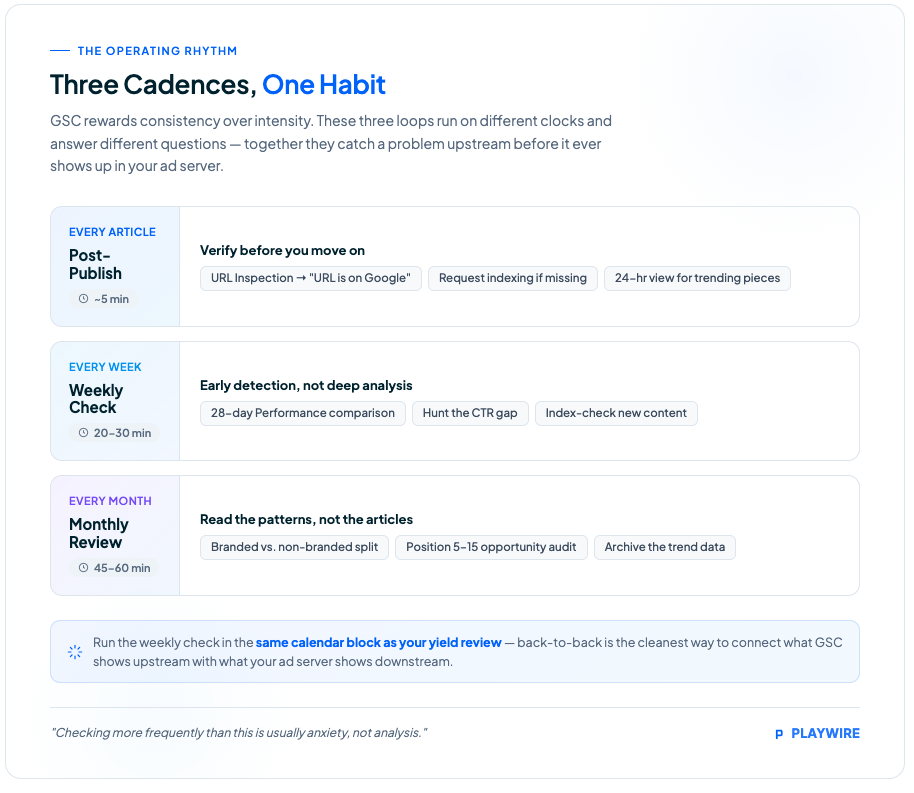
Your weekly GSC session should take 20-30 minutes. The goal is early detection, not deep analysis.
GSC is most valuable when used consistently, not just when something goes wrong. Build it into the same calendar block as your weekly yield review. Running them back-to-back is the cleanest way to connect what GSC shows you upstream with what your ad server shows you downstream.
Step 1: Run the Performance report comparison.
Open the Performance report and set a 28-day window. Then use the date comparison feature to pull the equivalent prior period. You're looking for three things:
| Signal | What It Looks Like | What It Means |
|---|---|---|
| Impressions dropping | Prior period was higher | Google is showing your pages less. Rankings may be slipping. |
| Clicks dropping without impression change | Impressions flat, clicks down | CTR degradation. Titles or meta descriptions may need work. |
| Both rising | Week-over-week growth | Content strategy working. More monetizable sessions incoming. |
The impression trend is your leading indicator. Impressions predict pageview volume, and pageview volume is the denominator under every revenue metric you track. A meaningful drop in impressions is your signal to investigate before the pageview loss compounds.
Step 2: Hunt the CTR gap.
Sort the Queries tab by impressions, descending. Scan for pages with high impression counts and CTRs that look low relative to their position. A high impression count with a low CTR usually points to a mismatch between your title or meta description and what the searcher expects to find, and fixing that mismatch is often the fastest way to turn existing visibility into actual traffic. Our guide on how to use Google Search Console to improve SEO on your publishing site walks through exactly how to action these CTR opportunities.
For ad publishers, this is free inventory. You already ranked. The impression was counted. You just didn't convert it into a session that could serve an ad.
Step 3: Check the Page Indexing report for new content.
Scroll through any articles published in the last seven days. Confirm they're indexed. Anything stuck in "Discovered - currently not indexed" or "Crawled - currently not indexed" is a problem worth addressing immediately. Those "Crawled - currently not indexed" pages may include content that could rank with better optimization, so treat them as a to-do list, not background noise. Our guide to diagnosing and fixing Google coverage issues covers every status type in detail.

The Post-Publish Check: Verify Before You Move On
This one is separate from the weekly review and takes five minutes per article. Run it every time you publish content you care about.
Open URL Inspection, paste the URL, and run the check. You want to see "URL is on Google" with a valid index status. If it isn't indexed yet, request indexing directly from the tool. URL Inspection lets you see any page on your site exactly as Google sees it, check whether Google can access and index it, and request indexing after important changes.
The 24-hour view in the Performance report is useful here too. If you're publishing on a trending topic, check whether the article is picking up search impressions within hours of publication. GSC launched a '24 hours' view that displays data with only a few hours' delay, showing the recent performance of pages, queries, and published content with hourly granularity. That feedback loop matters when timing is part of the content strategy, something news publishers running SEO workflows for timely content already know to exploit.
If you want to push new content into Google's index faster than a standard crawl allows, our breakdown of how to get Google to index your site faster covers the specific levers available and why every hour of indexing delay costs you.
Related Content:
- How to Use Google Search Console to Improve SEO on Your Publishing Site: Turns the signals from your weekly Performance report check into a concrete SEO improvement process for publishers.
- SEO Publishing Best Practices: What the Data in Google Search Console Is Telling You: How to read GSC data as a content strategy signal, not just a technical health check.
- Google's AI Search Updates Give Publishers a Real Shot at More Clicks: How recent AI search changes affect the CTR and click patterns you're monitoring in your weekly GSC review.
- AI Search Is Eating Publisher Traffic: Here's What to Do: The strategic response when GSC shows declining clicks despite stable impressions. A pattern increasingly driven by AI search behavior.
- SEO for Publishers: How to Build a Search Strategy Around Your Content Model: The broader search strategy that makes your GSC workflow worth running. Aligning your content model to the queries GSC will help you win.
The Monthly Review: Read Your Content Strategy's Report Card
Once a month, block 45-60 minutes for the deeper analysis. This is where you step back from individual articles and evaluate patterns.
Non-branded vs. branded performance split.
This is the most important monthly diagnostic for an ad-supported publisher focused on audience growth. Non-branded performance is the clearest proxy for topical authority, content effectiveness, and organic discovery and reach. Branded traffic tells you existing readers are returning. Non-branded traffic tells you new readers found you through content, and new readers are new pageviews and new ad impressions.
The branded queries filter automatically differentiates between branded and non-branded queries, where a branded query includes your brand name, variations or misspellings of it, and brand-related products or services. Apply the filter, note the non-branded impression and click trends, and compare month over month. If non-branded impressions are growing, your content strategy is working. If they're flat while branded grows, you're deepening engagement with existing readers but not expanding your audience.
Position 5-15 opportunity audit.
Cross-reference average position with CTR to find quick wins, specifically positions 5 to 15 with solid volume. A page sitting at position 8 on a meaningful query is often one refresh. A stronger title, a tighter intro, a few added sections. Away from a top-five spot. Top-five positions drive dramatically higher CTRs. More clicks means more sessions, and more sessions means more ad impressions filling against your floor prices.
Export these pages to a spreadsheet. Prioritize by impressions, because the pages with the most search visibility have the most to gain from a ranking improvement. Our SEO publishing best practices guide explains how to read these GSC signals as part of a broader content improvement cycle.
Historical trend archiving.
Google Search Console operates on a rolling 16-month window for performance data. Once data ages out of that window, it's gone. Export a monthly snapshot, clicks, impressions, CTR, position. To a spreadsheet or your BI tool. Year-over-year comparisons are critical for ad publishers managing seasonal revenue patterns, and you can't run them if you don't have the data.
Next Steps:
- Google Search Console for Publishers: How to Use GSC to Protect Ad Revenue: The pillar resource connecting every GSC capability back to ad revenue protection. The logical next read after mastering this workflow.
- How to Index My Site on Google: Diagnosing and Fixing Coverage Issues: The full diagnostic guide for every Page Indexing report status, with specific fixes for each coverage problem.
- How to Get Google to Index Your Site Faster (And Why Every Hour Counts): Advanced tactics for accelerating Google's crawl of new content, essential for publishers where indexing speed directly affects revenue timing.
- How to Use AI to Increase Ad Revenue: A Publisher's Guide to Intelligent Optimization: Once GSC is protecting your traffic, this guide covers how to squeeze more revenue from every session that arrives.
- Beyond Google Ad Revenue: Sophisticated Strategies for Sophisticated Publishers: Diversification strategies for publishers who've optimized their GSC workflow and are ready to expand beyond Google-dependent revenue.
The 2025-2026 GSC Features Publishers Need to Know
Google spent 2025 and early 2026 shipping features that matter specifically to publishers watching their traffic-to-revenue pipeline. Here's what changed and how to use it.
The 24-hour view collapsed the feedback loop. Google decreased the average data delay by almost half, with the new 24-hour view showing hourly granularity with only a few hours of delay. For publishers chasing trending topics, the difference between reacting while a story is still hot and finding out you missed the window is now visible inside GSC itself.
The branded vs. non-branded filter solved a reporting problem publishers have lived with for years. Before this filter existed, your GSC Performance report mixed branded and non-branded queries together, making it nearly impossible to measure whether your content strategy was actually growing new audiences. Now it's a single click to isolate either segment. Google uses an internal AI-assisted system to classify queries, and some queries may be misclassified, so treat the filter as a directional signal rather than an exact count, especially for brand names that double as common words.
AI Mode traffic now appears inside GSC. Traffic from Google's AI Mode search experience is counted inside Search Console under the "Web" search type, though you can't yet filter exclusively for AI Mode results. As AI search changes how publishers earn clicks, this data will become more valuable. Watch for it now so you have a baseline when the filtering capability eventually arrives.
Natural language filters landed in December 2025. Instead of manually stacking filter conditions, you can type a request like "show me mobile queries with high impressions but low CTR in the last 28 days" and GSC configures the report automatically. Less time building filters means more time acting on what they reveal.
Know When the Tool Is Lying to You
Build a data reliability check into your workflow. GSC has had notable issues recently, and misreading a Google-side reporting problem as a real traffic drop leads to wasted time and unnecessary alarm.
Google Search Console misreported impression data since May 13, 2025 due to a logging error, with corrections rolling out afterward. Before that, performance reports stopped updating after October 19, 2025, creating a multi-day data gap. In both cases, Google confirmed these were internal data-processing problems on their end, not problems with your website, and they did not affect your site's ranking, crawling, or indexing.
The discipline is simple: when your GSC numbers look alarming, verify the data is current before you act on it. A quick search for recent GSC outages takes 60 seconds and can save you hours of chasing a problem that doesn't exist. Anchor your decisions to multi-day trends, not single-day swings.
See It In Action:
- TheJeopardyFan.com, 2x RPM Increase After Switching from AdSense: How a solo publisher with 1M+ monthly pageviews doubled RPMs and eliminated hours of manual ad quality review by switching monetization partners.
- Squaredle, Doubled Ad Revenue with Full Granular Control: How a popular word puzzle game doubled ad revenue immediately after switching, with real-time Slack/Discord support and JavaScript APIs for single-page app flexibility.
- SEO for News Publishers: Using Google Search Console for Timely Content: How news publishers use GSC's 24-hour view and post-publish indexing checks to capture trending traffic before the story goes cold.
- Agency Revenue Drops Signal AI Search Traffic Shift for Publishers: Real-world evidence of what happens when publishers don't monitor their GSC traffic pipeline, and what the AI search shift means for revenue.
Connecting GSC to the Revenue Layer
GSC stops at the search result. It tells you whether sessions are coming. What you do with those sessions. How many ad impressions they generate, what those impressions earn, how your floor prices and demand mix perform. That's a separate layer entirely.
The two need to be read together. Your pageview RPM can look healthy while total revenue falls simply because session volume dropped. Without GSC, that kind of traffic-driven revenue decline is genuinely hard to diagnose because your monetization metrics all look fine. With GSC running on a consistent cadence, you trace the loss back to a ranking slip or an indexing failure in the same week it starts.
Integrating GSC with Google Analytics 4 offers a complete view of the user journey, from keyword impression to on-site behavior and conversion. That integration closes the gap between the traffic layer GSC owns and the session behavior that determines how many ad impressions each visit actually produces. If you want the full picture of how GSC protects your ad revenue across the entire traffic pipeline, that resource connects all the dots between search visibility and yield performance.
For publishers who want to build the search strategy that feeds this workflow, our SEO for publishers guide covers how to structure your content model around the queries GSC will eventually help you dominate.
GSC vs. Google Analytics 4: Different Tools, Different Layers
Publishers sometimes conflate the two, which leads to using each one for questions it can't answer. Here's the clean distinction.
| Dimension | Google Search Console | Google Analytics 4 |
|---|---|---|
| What it measures | Search visibility: rankings, indexing, clicks from Google Search | On-site behavior: sessions, engagement, conversions, revenue |
| Data source | First-party data directly from Google | Your site's tracking code |
| Primary question answered | "Can Google find my content and are people clicking?" | "What are visitors doing once they arrive?" |
| Revenue connection | Upstream: predicts whether sessions will show up | Downstream: measures what those sessions produce |
| Key limitation | Stops at the click. No on-site behavior. | Doesn't show search rankings or indexing status. |
Used together, they close the full loop from search ranking to ad impression to revenue.
Frequently Asked Questions
How does Google Search Console data connect to ad revenue?
GSC measures the search visibility that drives organic traffic. That organic traffic becomes sessions on your site. Those sessions generate the pageviews that sit in the denominator of your pageview RPM and every other ad revenue metric you track. When GSC impressions drop, fewer sessions arrive, and total ad revenue falls even if your RPM holds steady. GSC lets you catch that upstream problem before it compounds into a revenue loss visible in your ad server.
What does a drop in GSC impressions mean for my pageview RPM?
A drop in impressions means Google is showing your pages less often in search results, which typically leads to fewer clicks, fewer sessions, and fewer pageviews. Your RPM may stay flat or even improve during this period if your remaining traffic is high-quality, but your total ad revenue will fall because there are fewer sessions to monetize. Impressions are a leading indicator: the revenue effect usually follows the impression drop by several days.
How often should I check Google Search Console?
For ad-supported publishers, the right cadence is: the 24-hour view checked after publishing high-value content, a 20-30 minute Performance report review weekly, a post-publish URL Inspection check for every new article, and a 45-60 minute monthly session for the branded vs. non-branded split, position 5-15 audit, and data export. Checking more frequently than that is usually anxiety, not analysis.
What is the difference between Google Search Console and Google Analytics?
GSC measures what happens in Google Search before a user clicks: rankings, indexing status, impressions, and CTR. Google Analytics 4 measures what happens after the click: sessions, on-site behavior, engagement, and conversions. GSC answers "are people finding my content in search?" GA4 answers "what are they doing once they get there?" For ad publishers, both are necessary because revenue depends on both the arrival and the engagement.
How do I fix indexing issues in Google Search Console?
Open the Page Indexing report and filter for pages with issues. The two most common problem statuses for publishers are "Discovered - currently not indexed" (Google knows the URL exists but hasn't crawled it yet, often a crawl budget issue) and "Crawled - currently not indexed" (Google crawled it but decided not to index it, often a quality or thin-content signal). For the latter, improve the content quality, check for canonical tag conflicts, and use URL Inspection to request reindexing after changes. For high-priority new content, use URL Inspection to request indexing immediately after publishing rather than waiting for Google's regular crawl.
Is Google Search Console free?
Yes. GSC is free for any verified site owner. There are no paid tiers, no feature limits behind a paywall, and no data sampling penalties for free users. The only constraint on the Performance report is the 16-month rolling data window: export monthly snapshots if you need year-over-year comparisons.
Amplify What GSC Sends You
GSC protects and grows the traffic. Our RAMP platform makes sure every session that arrives earns as much as it can.
Our Revenue Intelligence® algorithms manage over 1.2 million price floor rules per website, optimizing every impression automatically. Our yield ops team monitors your setup continuously. Not month-end, not on request, but as an ongoing operational function. Our Advanced Yield Analytics give you the page-level revenue visibility to connect what GSC shows you upstream with what your ad stack produces downstream.
TheJeopardyFan.com saw RPMs double after switching from AdSense to Playwire, with current Q1 2025 RPMs matching or exceeding the best-performing days under their previous setup. That's what happens when consistent traffic management meets a monetization platform that actually competes for every impression.
You've built the search workflow. Now let's make sure the revenue side of the pipeline keeps up.
See what your current traffic is leaving on the table.
