
-1.png?width=800&height=157&name=1-playwire-logo-primary-2021%20(1)-1.png)


July 22, 2026

Editorial Policy
All of our content is generated by subject matter experts with years of ad tech experience and structured by writers and educators for ease of use and digestibility. Learn more about our rigorous interview, content production and review process here.

Key Points
- Google Search Console is a diagnostic tool, not a scorecard. The signals it generates. Impressions without clicks, ranking slippage, high-volume queries with low CTR. Are editorial instructions in disguise.
- Impressions are a leading indicator of pageview volume, which is the denominator under every ad revenue metric you track. When impressions climb or drop, your traffic and RPS follow.
- A high-impression, low-CTR query means you already ranked. You just didn't convert the visibility into a session. That's a headline and meta description problem, not a content problem.
- Pages sitting in positions 5 to 15 on meaningful queries are your highest-priority refresh targets. A modest ranking gain on those pages produces outsized pageview and revenue impact.
- Build a weekly GSC review cadence. The publishers who catch problems early fix them before the revenue loss compounds.
Most content teams treat their editorial calendar like a production line: publish, move on, repeat. Google Search Console is sitting there telling you which articles need attention, which headlines are failing, and which queries are within reach, and most editors never open it between publish dates.
That's a costly oversight for an ad-supported publishing business. SEO for publishers is the practice of ensuring Google can find, index, and rank your content. Because every ranking you earn is a future pageview, and every pageview is an ad impression waiting to be monetized. Your ad revenue is a direct function of pageviews, and your pageviews are a direct function of how well Google can find, index, rank, and surface your content. GSC provides granular insights into search performance, uncovers technical errors, and supports data-driven decision-making, but only if you know how to read what it's telling you.
This guide translates the specific signals GSC generates into concrete editorial actions. Not SEO theory. Actual decisions about headlines, refresh priorities, content gaps, and internal linking that content strategists and editors can make on a weekly basis.

Impressions Are Your Revenue Forecast
Before you look at clicks, rankings, or CTR, understand what impressions are telling you at a structural level.
The Performance report shows clicks, impressions, CTR, and average position, filterable by query, page, country, device, or date range up to 16 months. Impressions, the count of how often your pages appeared in search results. Are the leading signal for future pageview volume. When impressions grow on your non-branded queries, new readers are discovering your content, and more monetizable sessions are on the way. When impressions fall, you have advance notice of a traffic dip before it ever shows up in your ad server.
That upstream-to-downstream relationship is the chain most publishers miss: impressions → clicks → sessions → pageviews → ad impressions → RPM/RPS. Every metric in your ad server sits at the bottom of that chain. GSC lives at the top. Your RPM or RPS can look perfectly healthy while total revenue still falls, simply because fewer sessions are flowing in. Impressions in GSC are the earliest warning you'll get.
The practical implication: stop reading the Performance report as a scorecard of what happened and start reading it as a forecast of what's coming. Learn how to use Google Search Console to improve SEO on your publishing site and set a weekly review cadence, not a monthly one. GSC is most valuable when used consistently, not just when something goes wrong.

High Impressions, Low CTR: The Headline Problem Hidden in Your Data
This is the most underused signal in GSC, and it's one of the clearest editorial instructions the tool produces.
A page with high impressions and low CTR has already done the hard part. It ranked. Google decided your content was relevant enough to show to searchers. The searcher saw it and kept scrolling. That's a conversion problem at the headline and meta description layer, not a content or authority problem.
In the Performance report's Queries list, a high impression count with a low CTR usually points to a mismatch between your title or meta description and what the searcher expects to find, and fixing that mismatch is often the fastest way to turn existing visibility into actual traffic. For an ad publisher, closing that gap is free inventory. The ranking work is already done.
Here's how to act on it in your editorial workflow:
- Pull the query: Sort your Performance report by impressions, then filter for pages with CTR below your site average. These are your priority headline revision candidates.
- Read the query intent: Look at the exact query triggering the impressions, not just the page topic. The searcher's language tells you what your headline needs to promise.
- Rewrite the title tag and meta description: Match the searcher's vocabulary. Be specific about what the reader gets. Vague titles lose to specific ones every time.
- Test and watch: GSC's 24-hour data view lets you see whether a title change is moving CTR within hours, not days. Google decreased the average data delay by almost half as part of a broader freshness push, so that feedback loop is faster than it used to be.
One constraint worth flagging: GSC performance data usually has a 2 to 3 day delay for most reporting, even with the improved freshness rollout. For major editorial changes, give it a week before drawing conclusions.
Positions 5 to 15: Where Editorial Investment Has the Highest ROI
Not all content refresh work is equal. A page ranking at position 40 needs a structural overhaul. A page ranking at position 8 needs a focused push.
Cross-referencing average position with CTR to find quick wins, specifically positions 5 to 15 with solid volume, is the most efficient editorial investment available to a content team. These are pages close to breaking through to high-CTR territory on page one, and they need targeted attention, not a full rebuild. For a portfolio publisher managing dozens of active topics, this position band is your repeatable revenue optimization loop: GSC points at the exact URLs where a modest ranking gain translates directly into more monetizable sessions. Understanding what the data in Google Search Console is telling you across these position ranges is where editorial and revenue strategy converge.
The editorial actions that move pages in this range are more specific than a generic "content refresh":
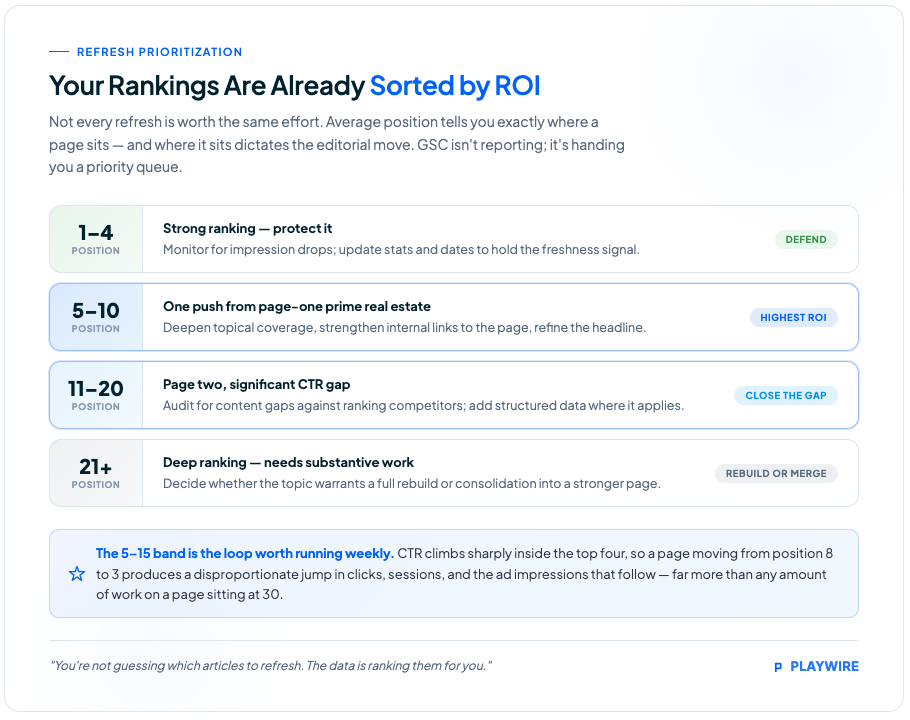
For a publishing team managing dozens of active topics, this table turns GSC from a reporting tool into a content prioritization framework. You're not guessing which articles to refresh. The data is ranking them for you.
Essential Background Reading:
- What Is Google Search Console? A Guide for Web Publishers: The foundational overview of what GSC is, how it works, and why publishers should treat it as a revenue tool rather than an SEO checkbox.
- What Does Google Search Console Do? A Feature-by-Feature Breakdown: A detailed walkthrough of every major GSC report and what each one is actually measuring. The prerequisite for using the data strategically.
- How to Set Up Google Search Console: A Step-by-Step Guide for Publishers: Property configuration, verification methods, and the setup decisions that affect how you can segment and filter your data later.
- The Ultimate SEO Best Practices Checklist: A structured reference for the on-page and technical SEO fundamentals that determine whether GSC will have good signals to report in the first place.
Pages Losing Position: The Refresh Trigger Most Teams Miss
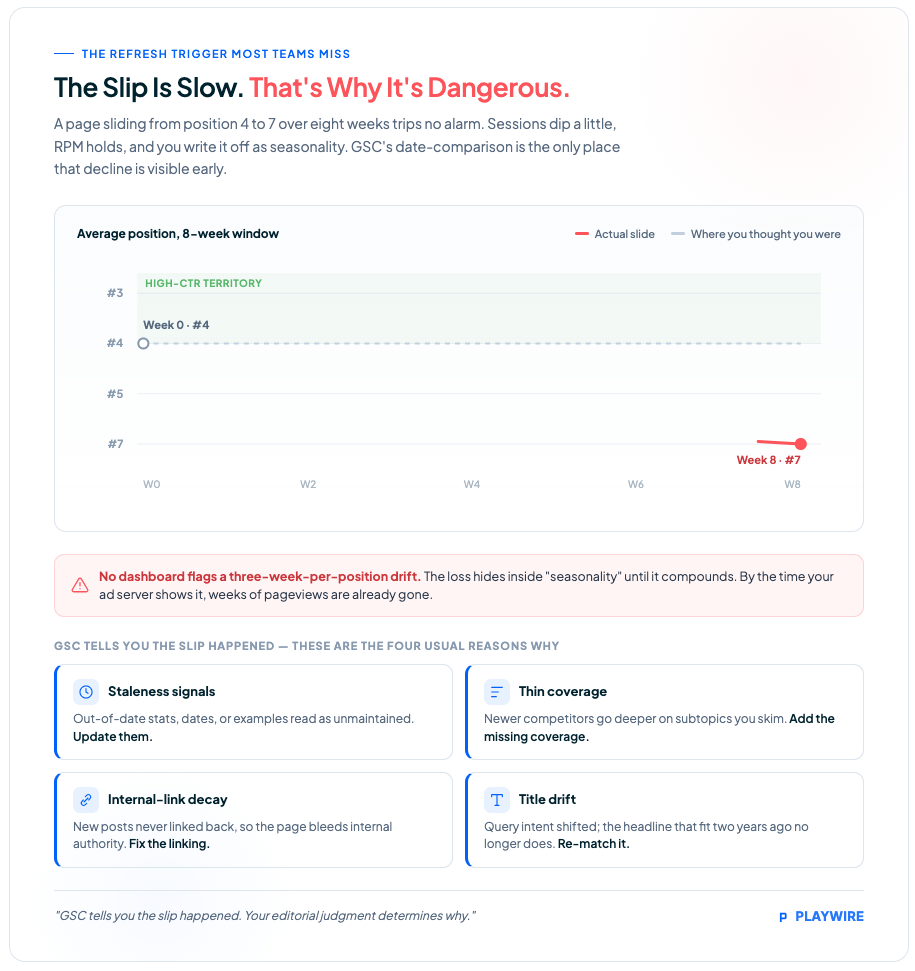
Ranking slippage is slow. That's why it's dangerous. A page that drops from position 4 to position 7 over eight weeks won't trigger any alert in your analytics. Your sessions will dip slightly. Your RPM might hold. You'll attribute the revenue miss to seasonality and move on.
GSC's date-comparison feature is how you catch this. Use the date comparison feature to see seasonal trends or the impact of algorithm updates on your traffic. Compare the current period to the prior period, then filter specifically for pages where average position has declined. That filtered list is your refresh queue.
Ranking slippage on established content usually has a few consistent causes:
- Staleness signals: Statistics, dates, or examples that are visibly out of date tell both users and Google that the content hasn't been maintained. Update them.
- Thin coverage: Competing pages have since been published with more depth on subtopics your article skims. Add the missing coverage.
- Internal linking decay: New content on your site hasn't been linked back to the older article, so it's losing internal authority relative to newer pages. Fix the linking.
- Title drift: The query landscape around a topic shifts over time. The headline that matched intent two years ago may not match it now.
The refresh doesn't need to be a full rewrite. It needs to address whatever caused the slip. GSC tells you the slip happened. Your editorial judgment determines why. For a deeper look at how GSC features break down by function, the feature-by-feature breakdown covers each report's specific diagnostic role.
Related Content:
- Google Search Console for Publishers: How to Use GSC to Protect Ad Revenue: The pillar guide connecting GSC's diagnostic signals directly to publisher monetization outcomes. The strategic framework this article builds on.
- SEO for Publishers: How to Build a Search Strategy Around Your Content Model: How to structure a content strategy around organic discovery, topical authority, and the search signals GSC measures.
- What Separates the Top 10% of Website Publishers From Everyone Else: Data-Backed: Data-driven analysis of the publishing behaviors and platform practices that consistently produce higher traffic and revenue performance.
- Session-Based Ad Layout Strategy: Beyond the Pageview Mindset: How session-level thinking about ad layout connects to the traffic volume that GSC is upstream of. The bridge between search visibility and monetization depth.
- AI Search Is Eating Publisher Traffic: Here's What to Do: What happens when impressions rise but clicks fall, and the strategic response publishers need as AI Mode absorbs more queries.
Branded vs. Non-Branded Splits: Measuring Whether Your Content Strategy Is Working
Most GSC users look at total clicks and feel good or bad about the number. That's an incomplete read. The branded versus non-branded split is where you find out whether your content is genuinely growing your audience or just serving people who already know you exist.
The branded queries filter automatically differentiates between branded and non-branded queries, where a branded query includes your brand name, variations or misspellings, and brand-related products or services. You can apply this filter across all search types, limiting metrics like impressions, clicks, average position, and CTR to the selected group.
Why does this matter for editorial strategy specifically? Non-branded performance remains the clearest proxy for topical authority, content effectiveness, and organic discovery and reach. Branded traffic tells you people already know your publication. Non-branded traffic tells you your content is finding new readers. New pageviews, new sessions, and new ad impressions.
For a content team evaluating whether a topical expansion is working. Say, you've been publishing more in a new vertical for six months. The non-branded filter shows you whether that investment is generating organic discovery or just reinforcing your existing audience. Those are different outcomes, and they require different editorial responses. Publishers who want to understand what separates high-performing publishers from the rest consistently find non-branded growth at the center of that gap.
Two technical constraints worth knowing before you rely on this filter heavily: it's only available for top-level domain properties, not subdomain or path-level properties, and sites with low impression volume may not qualify. Structure your GSC property accordingly.

Indexing as a Revenue Protection Check
Every article that isn't indexed is dead inventory. It cost you to produce and earns nothing. For publishers operating at volume, the gap between "published" and "indexed" represents real revenue loss that never shows up anywhere because the page never earns a single impression.
The Page Indexing report is your production-line quality check. It shows which pages Google has discovered, crawled, and indexed. After every publish, and especially after high-value pieces, check that the page moves to indexed status. Use the URL Inspection tool to request crawling if it's sitting idle. It allows you to see any page on your site exactly as Google sees it, check whether Google can access and index it, and request indexing after important changes.
Pages marked "Crawled - currently not indexed" may include content that could rank with better optimization. Treat that status as an editorial signal, not just a technical one. Before escalating to your dev team, check whether the page has strong enough content to warrant indexing in the first place. When coverage issues are more complex, diagnosing and fixing GSC coverage errors requires a systematic approach beyond the basic URL inspection workflow.
One note on tool reliability: beginning around November 2025, the Page Indexing report stopped updating and remained stuck for nearly 30 days. Google confirmed these were internal data-processing problems on their end that did not affect actual crawling or indexing. Anchor your decisions to trends across multiple days rather than single-day snapshots, and export your data regularly since GSC only retains 16 months of performance history.
Next Steps:
- How to Use Google Search Console: A Revenue-Focused Workflow for Ad-Supported Publishers: The operational workflow that maps GSC's weekly, monthly, and quarterly data reviews to specific monetization decisions.
- How to Get Google to Index Your Site Faster (And Why Every Hour Counts): Practical techniques for compressing the gap between publish and index. Critical for publishers where timing determines traffic volume.
- How to Index My Site on Google: Diagnosing and Fixing Coverage Issues: A systematic guide to resolving the indexing errors that turn published content into invisible inventory.
- The 8 Best SEO Tools: How GSC fits alongside third-party rank trackers, crawlers, and analytics platforms in a complete publisher SEO stack.
- GA4 Views: Understanding Page-Level Metrics in Google Analytics 4: The downstream analytics layer that closes the loop between GSC's traffic data and on-site engagement and revenue metrics.
The GSC Features Most Publishers Haven't Used Yet
Google spent 2025 and early 2026 adding capabilities that matter specifically to ad-supported publishers watching their traffic-to-revenue pipeline. Most content teams haven't built them into their workflow yet.
The 24-hour view collapsed the feedback loop for trending content. Search Console launched a '24 hours' view for performance reports that displays data with only a few hours' delay, showing recent performance of pages, queries, and published content with hourly granularity. For a publisher who just pushed a time-sensitive piece, this means you can see whether it's gaining search traction within hours instead of days. The difference between catching a trending topic while it's hot and finding out you missed the window. For news publishers specifically, using GSC for timely content covers how that hourly granularity changes editorial decisions around breaking stories.
Natural language filtering, added in December 2025, removed most of the manual setup friction. You can now type a request like "show me mobile queries with high impressions but low CTR in the last 28 days" and GSC configures the report automatically. Less time building filters means more time acting on what they reveal.
AI Mode traffic is now surfaced inside GSC. Traffic from Google's AI Mode search experience is counted inside Search Console under the "Web" search type, though you can't yet filter exclusively for AI Mode results. Publishers watching the "Great Decoupling". Impressions rising while clicks fall as AI search absorbs queries without sending traffic, can now see at least a partial picture of that dynamic inside GSC itself.
These features don't require any additional setup. They're available now, and most of your competitors aren't using them yet.
See It In Action:
- Major Education and Utility Website. 168% Higher CPMs: How a publisher with 20 million monthly pageviews achieved 168% CPM growth and 76% revenue gains through traffic shaping and optimization. Without increasing traffic volume.
- Google Search Console Guide for Publishers: Traffic, Indexing, and Ad Revenue: A comprehensive publisher-specific GSC guide covering traffic diagnosis, indexing workflows, and how search visibility connects to measurable revenue outcomes.
- SEO for News Publishers: Using Google Search Console for Timely Content: How the 24-hour GSC view and faster indexing change editorial decisions for publishers where timing is the primary competitive advantage.
The Editorial Cadence That Keeps GSC Actionable
The biggest mistake content teams make with GSC isn't misreading the data. It's checking it sporadically and reacting in crisis mode instead of running consistent reviews.
Here's the cadence that converts GSC from an alarm system into an editorial planning tool:
| Frequency | What to Review | Editorial Decision It Drives |
|---|---|---|
| Weekly | Performance report: impressions, clicks, position changes | Identify CTR gaps for headline revisions; flag ranking slippage for refresh queue |
| After every publish | Page Indexing report + URL Inspection | Confirm new content is indexed and eligible to earn pageviews |
| Monthly | Branded vs. non-branded split; position 5-15 pages | Evaluate content strategy effectiveness; prioritize next refresh cycle |
| Quarterly | 16-month trend comparison | Identify seasonal patterns; plan content investment for upcoming peak periods |
The weekly performance check is your revenue early-warning system. A meaningful decline in impressions or clicks is your signal to investigate before the pageview loss compounds into an ad revenue loss. The revenue-focused GSC workflow for ad-supported publishers maps this cadence to specific monetization outcomes if you want to operationalize it further.
Frequently Asked Questions
How does GSC connect to ad revenue for publishers?
GSC sits one layer upstream of your ad revenue metrics. Every click in GSC becomes a session on your site. Those sessions generate the pageviews that sit in the denominator of your pageview RPM and session RPS. When GSC clicks drop, pageview volume follows, and total ad revenue falls even if your RPM holds steady. GSC is the only tool that shows you this top-of-funnel data using first-party data directly from Google, with no third-party estimates.
What is the 16-month data limit in Google Search Console?
Google Search Console operates on a rolling 16-month window for performance data covering clicks, impressions, CTR, average position, queries, pages, countries, and devices. Once data ages past that window, it's gone permanently from GSC. Publishers who need longer historical records for year-over-year revenue planning need to export and warehouse that data themselves before it ages out.
How do I use GSC's branded vs. non-branded filter?
The branded queries filter is available in the Performance report for top-level domain properties. It automatically classifies queries as branded (containing your brand name, variations, or misspellings) or non-branded. Apply it to isolate non-branded performance, which shows whether your content strategy is generating organic discovery from new readers rather than just serving your existing audience. The filter is available across all search types and limits metrics like impressions, clicks, average position, and CTR to the selected group.
How should publishers handle GSC data reliability issues?
GSC has had documented reliability problems, including a multi-day performance data freeze after October 2025 and an impression logging error starting May 13, 2025. The practical response is to anchor decisions to multi-day trends rather than single-day snapshots, cross-reference GSC data against your analytics when numbers look alarming, and maintain your own data export process so a Google-side outage doesn't leave you blind. During confirmed Google-side delays, your site's actual crawling, indexing, and rankings are not affected. Only the reporting is.
What is the position 5-15 opportunity in GSC?
Pages ranking in positions 5 to 15 on meaningful queries are close to page-one territory but haven't broken through yet. Because CTR rises sharply in positions 1 through 4, a page moving from position 8 to position 3 generates a disproportionate increase in clicks and sessions, and the downstream ad impressions that follow. For ad-supported publishers, these pages represent the highest-ROI editorial refresh targets: a focused improvement (stronger topical depth, better internal linking, headline refinement) produces outsized revenue impact compared to work on pages ranking at position 30 or below.
Connecting Search Visibility to Revenue with Playwire
GSC is the upstream signal. What happens once those sessions arrive on your site determines how much revenue each one generates.
Our RAMP platform closes that loop. Our granular analytics let you move from GSC's traffic-level reporting down to individual ad unit performance, demand source breakdowns, and page-level revenue data. You can see which content GSC is sending traffic to and exactly how that traffic is monetizing. Down to the impression.
The editorial teams we work with treat these two layers as one integrated view: GSC for visibility and session volume, our analytics for revenue per session and yield optimization. When a content refresh improves a page's position from 9 to 4, the traffic gain shows up in GSC. The revenue impact shows up in RAMP.
That's the full picture: search visibility gets the sessions to your site, and a serious monetization platform makes sure every one of those sessions earns everything it can. We've seen what that combination produces. Including a major education and utility publisher that achieved 168% higher CPMs and 76% revenue growth through focused optimization without increasing traffic volume.
If you're serious about connecting your publishing decisions to measurable revenue outcomes, that's where we start.
Want to see how much your current search traffic could be earning? Apply to work with Playwire.
